
The pull request is one of the best places to hand repetitive engineering work to an agent. It already contains the change, the discussion, the review boundary, and the checks that decide whether the work is ready to merge.
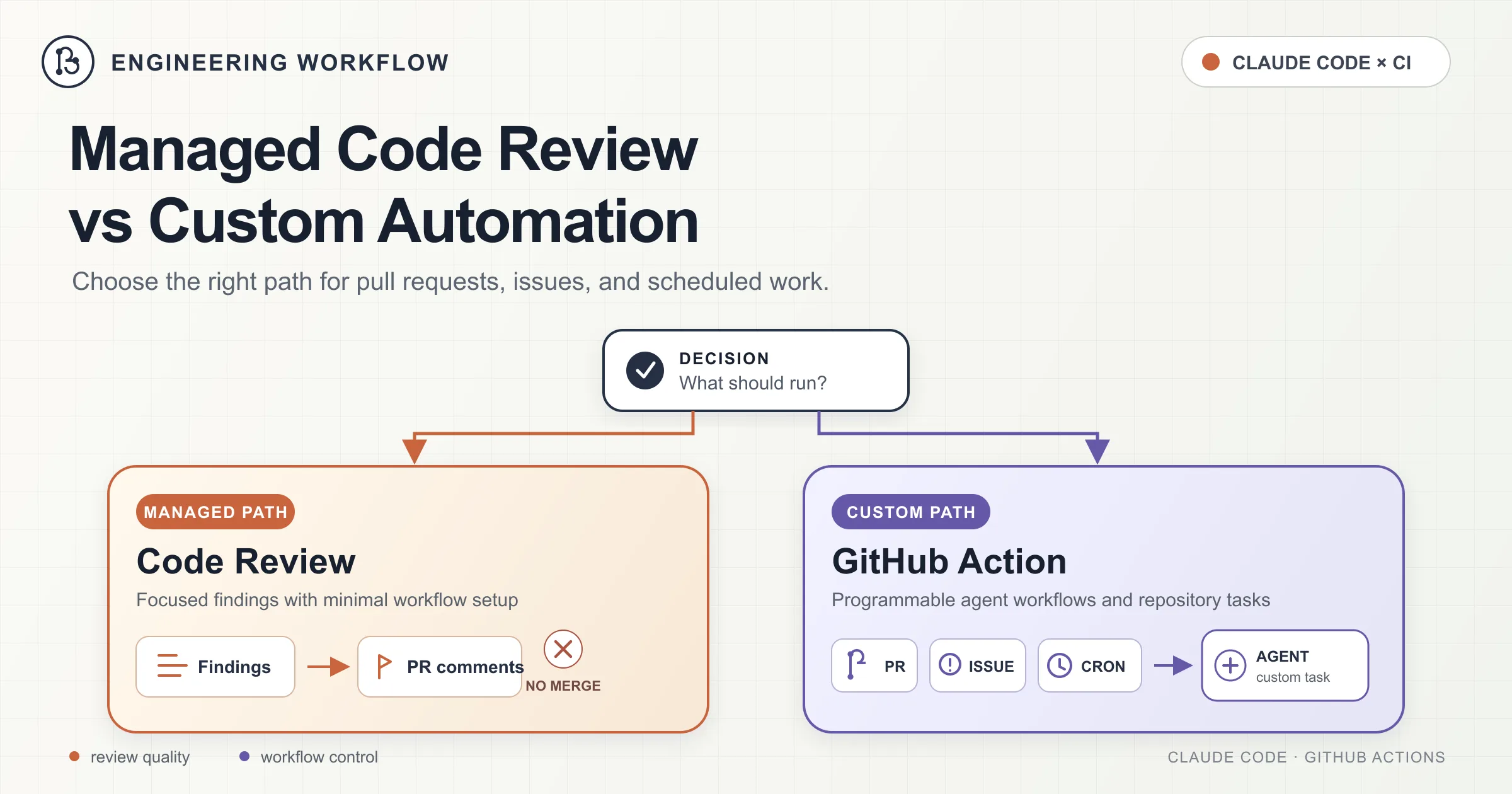
Claude offers two different ways to work inside that boundary:
- Code Review is an Anthropic-hosted service that automatically inspects pull requests and posts findings.
- Claude Code GitHub Actions runs Claude Code inside a GitHub Actions workflow, where it can answer questions, modify files, push commits, create issues, and perform custom automation.
They overlap, but they are not substitutes for each other.
The managed service is the better default when the job is simply: review this pull request and show me the important problems. The GitHub Action is the right tool when the job becomes: do something in response to a GitHub event.
This article explains both paths, shows working workflow examples, and covers the permission and security decisions that matter once Claude can modify a repository.
The Decision in One Table
| Requirement | Managed Code Review | Claude Code GitHub Action |
|---|---|---|
| Automatically review pull requests | Best fit | Possible, but requires a workflow |
| Post inline findings on changed lines | Built in | Configurable |
| Implement requested changes | No | Yes |
| Push commits to a branch | No | Yes |
Respond to @claude comments | Review commands only | Yes |
| Run on a cron schedule | No | Yes |
| Use custom GitHub events | No | Yes |
| Run on your GitHub runner | No | Yes |
| Use Amazon Bedrock, Google Vertex AI, or Microsoft Foundry | No | Yes |
| Require Team or Enterprise | Yes | No, but API or provider access is required |
| Work with Zero Data Retention enabled | No | Depends on the chosen Action authentication and provider setup |
The practical rule is simple:
Use managed Code Review for review. Use the GitHub Action for action.
The Managed Path: Code Review
Code Review is the lowest-maintenance option. Anthropic hosts the review infrastructure, the Claude GitHub App connects it to selected repositories, and review results appear directly in the pull request.
You do not maintain a workflow file, provision a runner, or decide which tools the agent may call. An organization owner enables the service, chooses the repositories, and selects when reviews should run.
How Managed Reviews Work
When a review starts, multiple specialized agents examine the pull request diff and the surrounding code in parallel. The review is not limited to reading changed lines in isolation. It uses the wider repository context to look for issues such as:
- Incorrect application logic
- Security vulnerabilities
- Broken edge cases
- Regressions
- Inconsistent behavior across related code paths
- Repository-specific rule violations
Candidate findings pass through a verification step before they are reported. The service then deduplicates the results, ranks them, and posts the useful findings as inline comments.
Each finding receives one of three severity labels:
| Severity | Meaning |
|---|---|
| Important | A bug that should normally be fixed before merging |
| Nit | A smaller issue worth fixing, but not normally merge-blocking |
| Pre-existing | A real issue in the repository that was not introduced by the pull request |
The complete result is also written to the Claude Code Review check run. That check includes a summary table and annotations in the Files changed view, even when GitHub cannot attach an inline comment to a line that moved.
Code Review Does Not Approve or Block Pull Requests
Managed Code Review deliberately keeps the final judgment with the engineering team.
The check run completes with a neutral conclusion. Claude does not approve the pull request, request changes as a human reviewer, or block merging through branch protection.
That separation matters. Code Review is an analysis layer, not a replacement for repository governance. Human reviewers still decide whether a finding is valid, whether the risk is acceptable, and whether the pull request is ready.
A team that wants to build a merge gate can parse the severity information from the check run in a separate workflow, but the managed service does not enforce that policy by itself.
Review Trigger Options
Code Review can be configured independently for each repository.
The available behaviors are:
- Once after pull request creation: review when a pull request opens or moves out of draft.
- After every push: review every update to the pull request branch.
- Manual: review only after an authorized repository user requests it.
A manual review is started with a top-level pull request comment:
@claude review
As of July 2026, this command starts one review and does not subscribe the pull request to reviews after future pushes.
To start a review and review every later push, use:
@claude review always
To state the one-off behavior explicitly, use:
@claude review once
This distinction is important because older behavior treated the bare @claude review command as a subscription. Teams with old internal documentation should update it.
Set Up Managed Code Review
An Owner or Primary Owner in the Claude organization enables Code Review once for the organization.
The setup flow is:
- Open the Claude Code administration settings.
- Find the Code Review section and select Setup or Configure.
- Install the Claude GitHub App in the GitHub organization.
- Grant the app access only to the repositories that need reviews.
- Select a review behavior for each repository.
- Open a test pull request and confirm that the Claude Code Review check appears.
The GitHub App requests read and write access to repository contents, issues, and pull requests. Managed review itself reads repository contents and writes pull request findings. The broader permission set also supports other Claude GitHub integration features.
Customize Reviews with CLAUDE.md and REVIEW.md
Managed Code Review reads two repository files, but they serve different purposes.
CLAUDE.md contains general project instructions used across Claude Code. During managed review, newly introduced violations are normally reported as nits.
REVIEW.md is specific to managed Code Review. It is placed at the repository root and injected into the review agents as high-priority guidance. Use it to define:
- What qualifies as an Important finding
- Which paths should be ignored
- Which checks CI already covers
- How many nits may be reported
- Which project-specific invariants must always be checked
- What evidence is required before reporting a finding
For example:
# Review instructions

## Important findings

Reserve Important for changes that can:

- Expose customer data
- Break tenant isolation
- Cause irreversible data loss
- Make a database migration unsafe during rolling deployment

Style and naming suggestions are Nit at most.

## Ignore

Do not report:

- Formatting or lint errors already enforced by CI
- Generated files under `src/generated/`
- Lockfile changes unless they introduce a security or compatibility problem

## Always verify

- Every database query is scoped to the authenticated tenant
- New API routes have an integration test
- Migrations remain backward compatible with the previous application version
Keep REVIEW.md focused. A long review policy can dilute the rules that matter most.
Cost and Runtime
Managed Code Review is currently a research preview for Team and Enterprise subscriptions. It is not available to organizations with Zero Data Retention enabled.
As of July 30, 2026, Anthropic's documentation says:
- Reviews complete in approximately 20 minutes on average.
- A review averages roughly USD 15–25.
- Cost increases with pull request size, repository complexity, and the number of candidate findings that require verification.
- Usage is billed separately through usage credits.
These are planning estimates, not a service-level guarantee. The After every push trigger can multiply cost quickly on active pull requests, so manual mode is often the better starting point for large or high-traffic repositories.
What Managed Code Review Will Not Do
The managed service has clear boundaries:
- It does not approve or reject a pull request.
- It does not merge code.
- It does not edit the branch.
- It does not apply fixes automatically.
- Replying to an inline finding does not start a conversation with Claude.
- It does not replace deterministic CI checks such as tests, linters, type checking, policy enforcement, or security scanners.
To act on a finding, update the code and push a new commit.
Apply Findings Locally with /code-review
Claude Code also provides a local /code-review command. This is separate from the hosted service and does not require the GitHub App.
From an active Claude Code session, run:
/code-review
By default, it reviews commits on the current branch that are ahead of the upstream branch, plus staged and uncommitted changes.
You can also provide a target:
/code-review src/auth/session.ts
/code-review 418
/code-review main...feature/session-refresh
To apply the findings to the working tree:
/code-review --fix
To post findings as inline pull request comments:
/code-review --comment
A useful workflow is:
- Let managed Code Review identify issues in the pull request.
- Pull the branch locally.
- Run
/code-review --fix. - Inspect the diff.
- Run tests and project verification.
- Commit and push the fixes.
One subtle difference matters: local /code-review follows CLAUDE.md, but it does not read the managed service's REVIEW.md.
The Do-It-Yourself Path: Claude Code GitHub Actions
The GitHub Action is for work that extends beyond review.
It can respond to issue and pull request comments, implement requested changes, create commits, generate reports, triage issues, inspect CI failures, update documentation, or run any other repository-scoped workflow that can be expressed as a GitHub event plus a prompt.
The action is:
uses: anthropics/claude-code-action@v1
Unlike the managed review service, the Action runs on a GitHub Actions runner. Claude API calls go to the configured provider, but the repository checkout, commands, and file operations run in the workflow environment.
Quick Setup
The recommended setup begins inside Claude Code:
/install-github-app
The installer walks through:
- Installing the Claude GitHub App.
- Selecting repository access.
- Adding GitHub Actions workflow files.
- Configuring the Anthropic API key secret.
Repository administrator access is required to install the app and add secrets.
The quick installer is intended for direct Anthropic API users. Amazon Bedrock, Google Vertex AI, Microsoft Foundry, and custom GitHub App configurations require provider-specific authentication.
How v1 Chooses Its Execution Mode
Claude Code Action v1 no longer requires a mode input.
It infers the mode from the workflow:
- No
promptinput: interactive mode, waiting for a trigger such as@claude. - A
promptinput is present: automation mode, running the prompt immediately when the workflow starts.
This makes the workflow shape itself the mode declaration.
Automation mode does not create a tracking comment by default. Set track_progress: true when a workflow has an issue or pull request context and progress comments are useful.
Inputs You Will Use Most Often
| Input | Purpose |
|---|---|
anthropic_api_key | Direct Anthropic API authentication; not required when another supported provider or authentication method is used |
claude_code_oauth_token | Alternative Claude Code authentication |
github_token | Optional GitHub token; the installed GitHub App can provide repository authentication |
trigger_phrase | Comment trigger; defaults to @claude |
prompt | Instructions for automation mode |
claude_args | Arguments passed to the Claude Code CLI |
settings | Claude Code settings as JSON or a settings file path |
use_bedrock | Use Amazon Bedrock |
use_vertex | Use Google Vertex AI |
use_foundry | Use Microsoft Foundry |
plugins | Claude Code plugins to install before execution |
plugin_marketplaces | Plugin marketplace Git URLs |
The v1 release moved model selection, turn limits, allowed tools, disallowed tools, and custom system instructions into claude_args.
A Workflow That Responds to @claude
Create .github/workflows/claude.yml:
name: Claude Code

on:
  issue_comment:
    types: [created]
  pull_request_review_comment:
    types: [created]

permissions:
  contents: write
  pull-requests: write
  issues: write
  id-token: write

jobs:
  claude:
    runs-on: ubuntu-latest
    timeout-minutes: 20

    steps:
      - uses: anthropics/claude-code-action@v1
        with:
          anthropic_api_key: ${{ secrets.ANTHROPIC_API_KEY }}
          trigger_phrase: "@claude"
          claude_args: |
            --max-turns 5
            --model claude-sonnet-5
            --allowedTools "Read,Edit,Write,Glob,Grep"
Because the workflow has no prompt, it runs in interactive mode.
A repository collaborator can now comment:
@claude implement the validation described in issue #418 and add tests
Claude receives the issue or pull request context, analyzes the repository, updates files when permitted, and reports the result through the GitHub integration.
The action only allows users with repository write access to trigger it by default. Bots are also blocked unless explicitly allowed.
Do Not Add github_token Automatically
The github_token input is optional when the installed Claude GitHub App provides authentication.
Using the GitHub App is usually preferable because:
- Comments appear under the Claude bot identity.
- The app token is short-lived and repository-scoped.
- Commits created through the app can trigger downstream workflows more reliably than commits made by the default GitHub Actions identity.
Pass ${{ secrets.GITHUB_TOKEN }} only when the workflow specifically needs the job-scoped token and you understand the behavioral differences.
A Scheduled Repository Maintenance Workflow
A scheduled workflow needs a durable destination for its result. A cron job has no natural pull request comment thread, so do not rely only on the Actions log.
The following workflow asks Claude to create one GitHub issue containing a weekly maintenance report:
name: Weekly Repository Maintenance

on:
  schedule:
    - cron: "0 9 * * 1"
  workflow_dispatch:

permissions:
  contents: read
  issues: write
  id-token: write

jobs:
  maintenance:
    runs-on: ubuntu-latest
    timeout-minutes: 30

    steps:
      - uses: actions/checkout@v6
        with:
          fetch-depth: 0

      - uses: anthropics/claude-code-action@v1
        with:
          anthropic_api_key: ${{ secrets.ANTHROPIC_API_KEY }}
          prompt: |
            Review repository activity from the previous seven days.

            Check:
            - Failed or flaky CI patterns
            - Dependencies that need attention
            - TODO or FIXME comments introduced recently
            - Open issues that appear stale or duplicated
            - Documentation that no longer matches the code

            Create one GitHub issue titled:
            "Weekly repository maintenance - YYYY-MM-DD"

            Include evidence and links. Do not modify repository files.
          claude_args: |
            --max-turns 10
            --model claude-sonnet-5
            --allowedTools "Read,Glob,Grep,Bash(git:*),Bash(gh issue:*)"
The schedule runs at 09:00 UTC every Monday. workflow_dispatch adds a manual Run workflow button in the Actions tab.
The prompt defines the destination, and the allowed tool list gives Claude enough access to inspect Git history and create an issue without granting general shell access.
Tuning an Unattended Run with claude_args
claude_args is the main control surface for the Action.
Limit the Agent Loop
claude_args: "--max-turns 5"
A turn limit prevents an unattended workflow from continuing indefinitely. Combine it with a workflow-level timeout-minutes value because the two limits protect different layers.
Pin or Select a Model
claude_args: "--model claude-sonnet-5"
A named model makes behavior and cost more predictable. Model availability and identifiers can change, especially across Anthropic, Bedrock, Vertex AI, and Foundry, so verify the identifier for the selected provider.
Restrict Tools
For a read-only report:
claude_args: |
  --allowedTools "Read,Glob,Grep"
For a workflow that may edit files but does not need a shell:
claude_args: |
  --allowedTools "Read,Edit,Write,Glob,Grep"
For a narrowly scoped command:
claude_args: |
  --allowedTools "Read,Glob,Grep,Bash(npm test:*),Bash(git diff:*)"
Do not grant unrestricted Bash merely because the workflow is unattended. Unattended execution is a reason to narrow permissions, not widen them.
Add Workflow-Specific Instructions
Use --append-system-prompt for instructions that belong to one workflow rather than every Claude Code task:
claude_args: |
  --append-system-prompt "Do not change public APIs. Prefer the smallest safe patch."
  --max-turns 8
Keep permanent repository conventions in CLAUDE.md. Keep event-specific behavior in the workflow prompt or appended system prompt.
Use Structured Outputs for Multi-Step Automation
The Action supports --json-schema. Claude's validated JSON result becomes the structured_output action output, which later workflow steps can consume.
This is useful when Claude should make a classification or recommendation but deterministic workflow code should perform the final action.
For example:
- name: Analyze test failure
  id: analyze
  uses: anthropics/claude-code-action@v1
  with:
    anthropic_api_key: ${{ secrets.ANTHROPIC_API_KEY }}
    prompt: |
      Inspect the failed test logs.
      Decide whether the failure is probably flaky.
    claude_args: |
      --json-schema '{"type":"object","properties":{"is_flaky":{"type":"boolean"},"confidence":{"type":"number"},"summary":{"type":"string"}},"required":["is_flaky","confidence","summary"]}'

- name: Show result
  run: |
    echo '${{ steps.analyze.outputs.structured_output }}' | jq .
This pattern is safer than asking the model to make every control-flow decision through prose.
Security Boundaries That Matter
A GitHub Action capable of editing code is a privileged automation system. Treat its prompt, event payload, repository content, token, and allowed tools as part of the threat model.
Grant the Minimum GitHub Permissions
Declare permissions explicitly.
A read-only analysis job may need only:
permissions:
  contents: read
  id-token: write
A job that comments on a pull request may add:
permissions:
  pull-requests: write
A job that creates an issue may add:
permissions:
  issues: write
Do not grant contents: write to a workflow that never modifies code.
Keep Secrets Out of Workflow Files
Store API keys and tokens in GitHub Secrets or use a supported short-lived identity mechanism such as workload identity federation.
Never place an API key directly in YAML:
# Do not do this.
anthropic_api_key: "sk-ant-..."
Use:
anthropic_api_key: ${{ secrets.ANTHROPIC_API_KEY }}
Keep the Default Write-Access Check
By default, only users with write access can trigger the interactive Action.
The allowed_non_write_users option bypasses that protection. Setting it to * means untrusted users may be able to send prompts into a workflow that holds repository credentials.
Use it only for tightly constrained workflows with minimal permissions and carefully restricted tools.
Treat Pull Request Content as Untrusted Input
Issue text, comments, Markdown, source files, test fixtures, and generated content can all contain prompt injection attempts.
This matters most in public repositories and workflows triggered by forks.
Avoid a privileged pull_request_target workflow that checks out a fork's head commit and then executes its scripts, dependencies, tests, or build commands. That pattern can expose repository secrets and write tokens to attacker-controlled code.
Restrict Bots Explicitly
Bots cannot trigger the Action by default.
When bot-triggered automation is needed, list trusted bot accounts explicitly. Avoid allowed_bots: "*", especially in a public repository.
Pin Third-Party Actions
For high-assurance environments, pin third-party actions to a full commit SHA rather than a floating tag. Tags such as @v1 are convenient, but a commit SHA provides stronger supply-chain control.
Review Agent-Generated Changes
An agent can produce a valid-looking but incorrect patch. Keep deterministic verification after the agent step:
- Unit and integration tests
- Type checking
- Linting and formatting
- Security scanning
- Migration checks
- Policy-as-code
- Human approval for sensitive changes
Claude should participate in the delivery pipeline, not become the pipeline's only control.
Common Design Mistakes
Rebuilding Managed Code Review in YAML Without a Reason
A custom Action can review pull requests, but that does not mean it should be the first choice.
Use managed Code Review when you want high-quality correctness review with inline findings and no workflow maintenance. Build a review workflow only when you need custom provider routing, structured outputs, unusual review policy, unsupported plan requirements, or a downstream automated action.
Giving a Report Workflow Write Access to Contents
A report that only reads files and creates an issue does not need contents: write.
Permissions should follow the intended side effects, not the maximum capability Claude might theoretically use.
Using a Prompt Without Defining the Output Destination
A scheduled workflow does not have a natural comment thread.
State whether the result should become:
- A GitHub issue
- A pull request comment
- A workflow summary
- A committed report file
- A structured output consumed by another step
- A message sent through an approved external integration
Allowing General Bash for Convenience
Bash(*) makes early experimentation easy and production hardening difficult.
Start with read-only tools, add file-editing tools when needed, and allow individual command families only after the workflow requires them.
Confusing Review Guidance with Enforcement
CLAUDE.md, REVIEW.md, and prompts guide model behavior. They do not replace deterministic policy.
Rules such as "never merge without passing tests" belong in branch protection and required checks. Rules such as "pay special attention to tenant scoping" belong in review guidance.
Which Path Should You Choose?
Choose managed Code Review when:
- The main goal is finding bugs in pull requests.
- You want inline findings without maintaining a workflow.
- Team or Enterprise availability and separate usage billing are acceptable.
- Anthropic-hosted review infrastructure fits the organization's data policy.
- A human will decide what to fix and whether to merge.
Choose Claude Code GitHub Actions when:
- Claude must edit files or push commits.
- Work should start from
@claudecomments. - The task runs on a schedule.
- You need a custom GitHub event.
- You need structured output for later workflow steps.
- You need Bedrock, Vertex AI, Foundry, or custom provider authentication.
- You need explicit control over tools, prompts, runner type, permissions, and timeouts.
Many teams should use both:
- Managed Code Review catches correctness problems.
- A comment-triggered Action implements focused changes.
- Deterministic CI verifies the result.
- Human reviewers make the final merge decision.
That division keeps each layer doing the job it is best at.
Final Recommendation
Start with managed Code Review for pull request analysis. It delivers the most value with the least infrastructure.
Add the GitHub Action when review turns into execution: implementing an issue, repairing CI, updating documentation, creating maintenance reports, or responding to repository events.
The important boundary is not managed versus custom. It is advice versus side effects.
Code Review gives advice.
GitHub Actions gives Claude permission to act.
Design permissions, tools, triggers, and verification around that difference.
References
- Claude Code: Code Review - code[.]claude.com/docs/en/code-review/
- Claude Code: GitHub Actions - code[.]claude.com/docs/en/github-actions/
- Anthropic: Claude Code Action - github[.]com/anthropics/claude-code-action/
- Anthropic: Claude Code Action Configuration - github[.]com/anthropics/claude-code-action/blob/main/action.yml
- Anthropic: Claude Code Action Security - github[.]com/anthropics/claude-code-action/blob/main/docs/security.md
- Anthropic: Claude Code Action Custom Automations - github[.]com/anthropics/claude-code-action/blob/main/docs/custom-automations.md
- Anthropic: Claude Code Action Solutions and Use Cases - github[.]com/anthropics/claude-code-action/blob/main/docs/solutions.md
- GitHub: Use
GITHUB_TOKENfor Authentication in Workflows - docs[.]github.com/actions/writing-workflows/choosing-what-your-workflow-does/controlling-permissions-for-github-token - GitHub: Workflow Syntax for GitHub Actions - docs[.]github.com/en/actions/reference/workflows-and-actions/workflow-syntax
- GitHub: Securely Using
pull_request_target- docs[.]github.com/en/actions/reference/security/securely-using-pull_request_target