
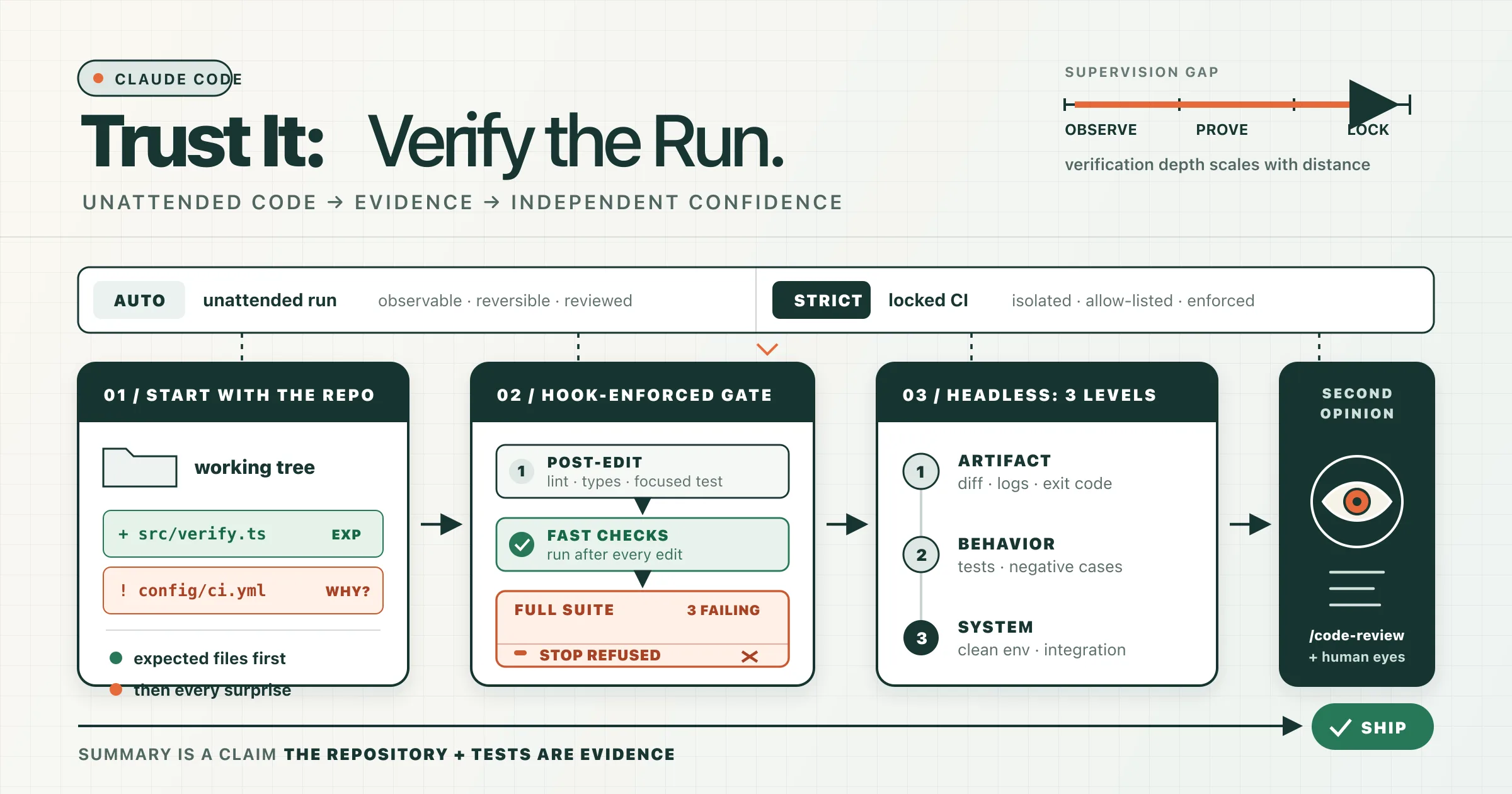
You handed Claude a task and let it work without watching every step. Now the session says the implementation is finished.
That is not the point where trust begins. It is the point where verification begins.
Hands-off Claude Code is useful because it removes the need to supervise every edit, command, and intermediate decision. The tradeoff is that you no longer have a reliable mental model of how the final state was produced. You did not see every detour, failed attempt, assumption, or unexpected file change.
The answer is not to stop using unattended runs. The answer is to verify them in proportion to how much visibility you gave up.
The less you watched the run, the more evidence you should require before shipping it.
A short session you observed closely may need a quick diff review and a focused test. A long unattended run, background task, or CI job needs a stronger chain of evidence: repository state, deterministic checks, structured output, and an independent review.
Verification should scale with the supervision gap
Not every run needs the same ceremony. Match the verification effort to the amount of autonomy, the size of the change, and the cost of being wrong.
| Run type | Minimum verification |
|---|---|
| Short, closely watched edit | Inspect the diff and run focused tests |
| Long interactive session | Review all changed files, run linting, type checks, and the relevant test suite |
| Unattended local or cloud run | Review scope drift, enforce a test gate, and request an independent code review |
| Headless CI run | Validate process status, machine-readable output, repository state, and independent CI checks |
| Production, security, identity, or infrastructure change | Require all of the above plus explicit human approval |
The important word is minimum. A three-line authentication change can deserve more scrutiny than a 300-line documentation update.
Keep unattended development runs in auto mode
For long unattended development work, use Claude Code's auto permission mode instead of bypassPermissions.
Auto mode routes relevant actions through a separate classifier that looks for dangerous behavior, including destructive operations, unexpected external targets, suspicious instructions, sensitive-data exposure, and actions that exceed the task you requested. It lets Claude continue through routine work without stopping for every permission prompt while preserving a safety layer around riskier actions.
That protection is valuable, but its scope is easy to misunderstand.
The classifier is a safety control, not a correctness checker. It can question whether a command is dangerous. It does not prove that:
- The implementation matches the requirements.
- The algorithm handles edge cases.
- The migration preserves existing data.
- The test suite is meaningful.
- The new authorization rule is correct.
- Claude changed only the files you expected.
Auto mode therefore does not lower the verification bar. It only gives the unattended run a safer execution boundary.
Avoid bypassPermissions on a normal workstation. That mode is intended for isolated containers, virtual machines, or similarly disposable environments where the process cannot damage the host or reach valuable credentials and infrastructure.
Use a stricter mode for locked-down CI
A headless CI job has a different shape. There is no person available to answer a prompt, and the job should usually have a narrow, predictable tool surface.
For that case, dontAsk can be stronger than auto mode. It allows explicitly pre-approved tools and denies operations that would otherwise require permission. This is useful when the job should read code, edit files, and run a small set of known verification commands—but nothing else.
A useful rule is:
- Use
autofor broad, trusted, unattended development tasks. - Use
dontAskwith a narrow allowlist for deterministic CI automation. - Use
bypassPermissionsonly inside a deliberately isolated environment.
Start with the repository, not Claude's summary
Do not begin verification by reading the final summary.
The summary is useful context, but it is still a claim made by the same agent that produced the work. It may be accurate while omitting the exact detail you need to notice: an unrelated configuration change, a weakened assertion, a new dependency, an untracked file, or a broad refactor hidden behind a small feature description.
Start with the repository state instead:
git status --short
git diff --stat
git diff --name-status
git diff --check
git diff --cached
If the work lives on a branch, compare the complete branch against its base:
git fetch origin
git diff --stat origin/main...HEAD
git diff --name-status origin/main...HEAD
git diff origin/main...HEAD
These commands answer different questions:
git status --shortexposes modified, staged, deleted, and untracked files.git diff --statshows the size and distribution of the change.git diff --name-statusmakes scope drift easy to spot.git diff --checkcatches whitespace errors and conflict markers.git diff --cachedensures staged changes are not hidden from the working-tree diff.git diff origin/main...HEADshows the branch-level change you are actually preparing to merge.
Untracked files deserve special attention because a normal git diff does not display their contents. If the status output contains ??, open those files explicitly.
Review expected files first, then unexpected files
Read the files that were part of the task plan first. That confirms the core implementation.
Then inspect everything outside the planned scope. Unexpected changes are where unattended runs become risky. Pay particular attention to:
- Authentication and authorization code.
- Database migrations.
- CI workflows.
- Deployment configuration.
- Infrastructure definitions.
- Dependency manifests and lockfiles.
- Environment templates.
- Generated snapshots.
- Tests with deleted assertions or broader mocks.
A lockfile change may be harmless. A modified workflow may be necessary. The point is not to reject every extra file; it is to require an explanation for every extra file.
Use /code-review, but keep your own eyes in the loop
Claude Code's local /code-review command reviews the current branch and working tree. It runs the review in a separate context and can inspect the surrounding code for correctness problems, regressions, and cleanup opportunities.
Run it before you begin fixing anything manually:
/code-review high
You can also give it an explicit target:
/code-review high main...my-feature
Start without --fix. A review is more useful when its findings remain separate from the implementation. Read the findings, confirm them against the code, and only then decide what should be changed.
The review is an additional signal, not a substitute for reading the diff. Both the implementation and the review are model-generated. Your strongest evidence still comes from deterministic tools and observed program behavior.
Turn tests into a gate, not a promise
The weakest verification pattern is this:
"Did you run the tests?"
"Yes, all tests passed."
That exchange gives you a statement, not evidence.
For unattended runs, move verification out of the prompt and into hooks. Hooks run deterministic commands at defined points in the Claude Code lifecycle, so the checks happen whether or not you remember to ask for them.
A practical setup uses two layers:
- A
PostToolUsehook runs fast checks after edits and feeds failures back to Claude immediately. - A
Stophook runs the full verification suite and prevents Claude from finishing while it is failing.
Configure the hooks
Create .claude/settings.json:
{
  "hooks": {
    "PostToolUse": [
      {
        "matcher": "Edit|Write",
        "hooks": [
          {
            "type": "command",
            "command": "${CLAUDE_PROJECT_DIR}/.claude/hooks/fast-checks.sh",
            "args": [],
            "timeout": 180
          }
        ]
      }
    ],
    "Stop": [
      {
        "hooks": [
          {
            "type": "command",
            "command": "${CLAUDE_PROJECT_DIR}/.claude/hooks/verify-stop.sh",
            "args": [],
            "timeout": 900
          }
        ]
      }
    ]
  }
}
The PostToolUse matcher limits the fast checks to file edits. Stop does not need a matcher because it runs when the main agent attempts to finish its response.
Run fast checks after edits
Create .claude/hooks/fast-checks.sh:
#!/usr/bin/env bash
set -uo pipefail

INPUT="$(cat)"
FILE_PATH="$(jq -r '.tool_input.file_path // empty' <<<"$INPUT")"

# Skip files that do not affect application code.
case "$FILE_PATH" in
  *.ts|*.tsx|*.js|*.jsx) ;;
  *) exit 0 ;;
esac

if ! npm run lint -- --quiet >&2; then
  echo "Lint failed after editing $FILE_PATH. Fix the reported issues." >&2
  exit 2
fi

if ! npm run typecheck >&2; then
  echo "Type checking failed after editing $FILE_PATH. Fix the reported issues." >&2
  exit 2
fi

exit 0
Adapt the commands and file patterns to your project. A Python project might run Ruff and a type checker; a Go project might run gofmt, go vet, or focused tests.
For PostToolUse, exit code 2 cannot undo the edit because the tool has already run. It does, however, send the failure back to Claude so the agent can correct the problem during the same run.
Keep these checks fast. Running a full integration suite after every edit can make the agent slower without adding useful feedback. Save the expensive gate for the end.
Refuse to stop while the full suite fails
Create .claude/hooks/verify-stop.sh:
#!/usr/bin/env bash
set -uo pipefail

INPUT="$(cat)"
WORKING_DIRECTORY="$(jq -r '.cwd' <<<"$INPUT")"
LOG_FILE="$(mktemp)"
trap 'rm -f "$LOG_FILE"' EXIT

cd "$WORKING_DIRECTORY"

if ! npm run lint >"$LOG_FILE" 2>&1; then
  cat "$LOG_FILE" >&2
  echo "Lint failed. Fix the errors before stopping." >&2
  exit 2
fi

if ! npm run typecheck >"$LOG_FILE" 2>&1; then
  cat "$LOG_FILE" >&2
  echo "Type checking failed. Fix the errors before stopping." >&2
  exit 2
fi

if ! npm test >"$LOG_FILE" 2>&1; then
  cat "$LOG_FILE" >&2
  echo "Tests failed. Fix the failures before stopping." >&2
  exit 2
fi

exit 0
Make both scripts executable:
chmod +x .claude/hooks/fast-checks.sh
chmod +x .claude/hooks/verify-stop.sh
A Stop hook that exits with code 2 prevents Claude from stopping and returns the error text to the agent. Claude can then inspect the failure, make another change, and try again. Claude Code limits consecutive Stop-hook continuations, so keep the verification command deterministic and avoid conditions the agent cannot resolve.
That is materially stronger than putting "always run the tests" in CLAUDE.md. The instruction is guidance. The hook is enforcement.
Do not let the agent weaken the gate
A passing suite is only meaningful if the run did not make the suite easier to pass.
When reviewing the diff, inspect test changes separately:
git diff origin/main...HEAD -- '*test*' '*spec*' '__tests__'
Look for:
- Deleted assertions.
- Tests changed to accept broader output.
- Exceptions that are now swallowed.
- Mocks replacing the behavior under test.
- Snapshot updates that were accepted without review.
- Skipped, quarantined, or marked tests.
- Reduced coverage of failure paths.
Tests are a gate only when the gate itself remains trustworthy.
Verify headless runs at three levels
A headless run should not be judged by one signal. Verify it at three separate levels.
1. Verify the process
The Claude Code process should exit successfully. A non-zero exit status indicates an execution failure, an invalid configuration, a budget or turn limit, a signal, or another condition that prevented normal completion.
Capture the result rather than printing it into an unreadable CI log:
mkdir -p artifacts

claude --bare -p "Implement the requested change" \
  --permission-mode dontAsk \
  --allowedTools "Read,Edit,Write,Bash(npm test),Bash(npm run lint),Bash(npm run typecheck)" \
  --output-format json \
  > artifacts/claude-result.json
--bare is useful for reproducible scripted runs because it skips automatically discovered project and user configuration. That also means it skips hooks, skills, plugins, MCP servers, auto memory, and CLAUDE.md. Do not use it when the job depends on those components unless you pass the required configuration explicitly.
External CI checks should remain the final authority either way.
2. Verify the structured result
JSON output gives the caller a result, session ID, and metadata. Validate that the expected fields exist instead of assuming that any JSON object means success:
jq -e '
  .session_id != null and
  (.result | type == "string") and
  (.result | length > 0)
' artifacts/claude-result.json > /dev/null
For workflows that need a machine contract, provide a JSON Schema and validate structured_output:
claude --bare -p "Implement the change and report the outcome" \
  --output-format json \
  --json-schema '{
    "type": "object",
    "properties": {
      "status": {"type": "string", "enum": ["completed", "blocked"]},
      "changed_files": {
        "type": "array",
        "items": {"type": "string"}
      },
      "notes": {"type": "string"}
    },
    "required": ["status", "changed_files", "notes"]
  }' \
  > artifacts/claude-result.json

jq -e '.structured_output.status == "completed"' \
  artifacts/claude-result.json > /dev/null
Structured output makes automation easier. It does not prove the claims inside the structure. Treat "status": "completed" as a report, not as test evidence.
If the run depends on plugins or MCP servers, consider stream-json and inspect the system/init event. Claude Code can continue after some plugin or MCP configuration failures, so a clean process exit alone may not prove that the expected integration was available.
3. Verify the repository independently
After Claude exits, let CI run the checks itself:
git status --short
git diff --check
npm run lint
npm run typecheck
npm test
Add project-specific gates where relevant:
npm audit --audit-level=high
npx secretlint '**/*'
Or, for a Python project:
uv run ruff check .
uv run ty check
uv run pytest
The agent's JSON tells you what it believes happened. The CI commands tell you what the repository actually does.
Get a cold second opinion
The original run has context, momentum, and commitment to the approach it chose. That is useful during implementation but undesirable during review. Once an agent has explained a design to itself repeatedly, it can become less likely to challenge the same assumptions.
Use a fresh session or a dedicated reviewer with no conversation history from the implementation.
In a new Claude Code session, run:
/code-review high main...my-feature
For an automated local review:
claude -p "/code-review high main...HEAD" \
  --output-format json \
  > artifacts/cold-review.json
A cold reviewer should focus on:
- Correctness and edge cases.
- Security boundaries.
- Error handling.
- Concurrency and state transitions.
- Backward compatibility.
- Data migration safety.
- Whether the implementation solved the requested problem rather than a nearby one.
- Whether tests genuinely cover the changed behavior.
Where practical, keep the reviewer read-only. Do not ask it to implement and judge the same change in one pass. Separate finding from fixing.
Build a verification record
For important unattended work, keep the evidence as CI artifacts or attach it to the pull request:
- The Claude JSON result and session ID.
- The final
git diff --statand changed-file list. - Lint, type-check, and test logs.
- Coverage output.
- The cold-review report.
- Security or dependency scan results.
- The final commit SHA.
This record makes failures diagnosable and approvals defensible. It also lets you improve the automation over time. If the same class of issue repeatedly survives the unattended run, turn that lesson into a test, hook, static rule, or CI check.
A practical shipping checklist
Before merging work produced by an unsupervised run, confirm all of the following:
- [ ] The changed-file list matches the intended scope.
- [ ] Untracked and staged files were inspected.
- [ ] The complete diff was reviewed, not only Claude's summary.
- [ ] Test changes did not weaken the verification suite.
- [ ] Linting and type checking passed outside the agent's own report.
- [ ] The relevant unit, integration, and end-to-end tests passed.
- [ ] Headless output was parsed and validated.
- [ ] Required plugins, hooks, and MCP servers loaded successfully.
- [ ] A fresh reviewer inspected important changes.
- [ ] Sensitive changes received explicit human approval.
Trust the evidence
"Claude did it while I was not looking" should not require faith.
Keep unattended development runs behind an appropriate permission boundary. Start with the actual repository state. Make deterministic checks unavoidable. Treat headless output as machine-readable reporting rather than proof. Then ask a fresh reviewer to challenge the result without inheriting the implementation's assumptions.
Once those controls are in place, the unattended run becomes ordinary engineering work: a change with a diff, tests, review findings, and evidence.
That is the point where you can trust it.
References
- Claude Code: Choose a permission mode - code[.]claude.com/docs/en/permission-modes
- Claude Code: Configure auto mode - code[.]claude.com/docs/en/auto-mode-config
- Claude Code: Hooks reference - code[.]claude.com/docs/en/hooks
- Claude Code: Run Claude Code programmatically - code[.]claude.com/docs/en/headless
- Claude Code: Code Review - code[.]claude.com/docs/en/code-review
- Claude Code: CLI reference - code[.]claude.com/docs/en/cli-reference