
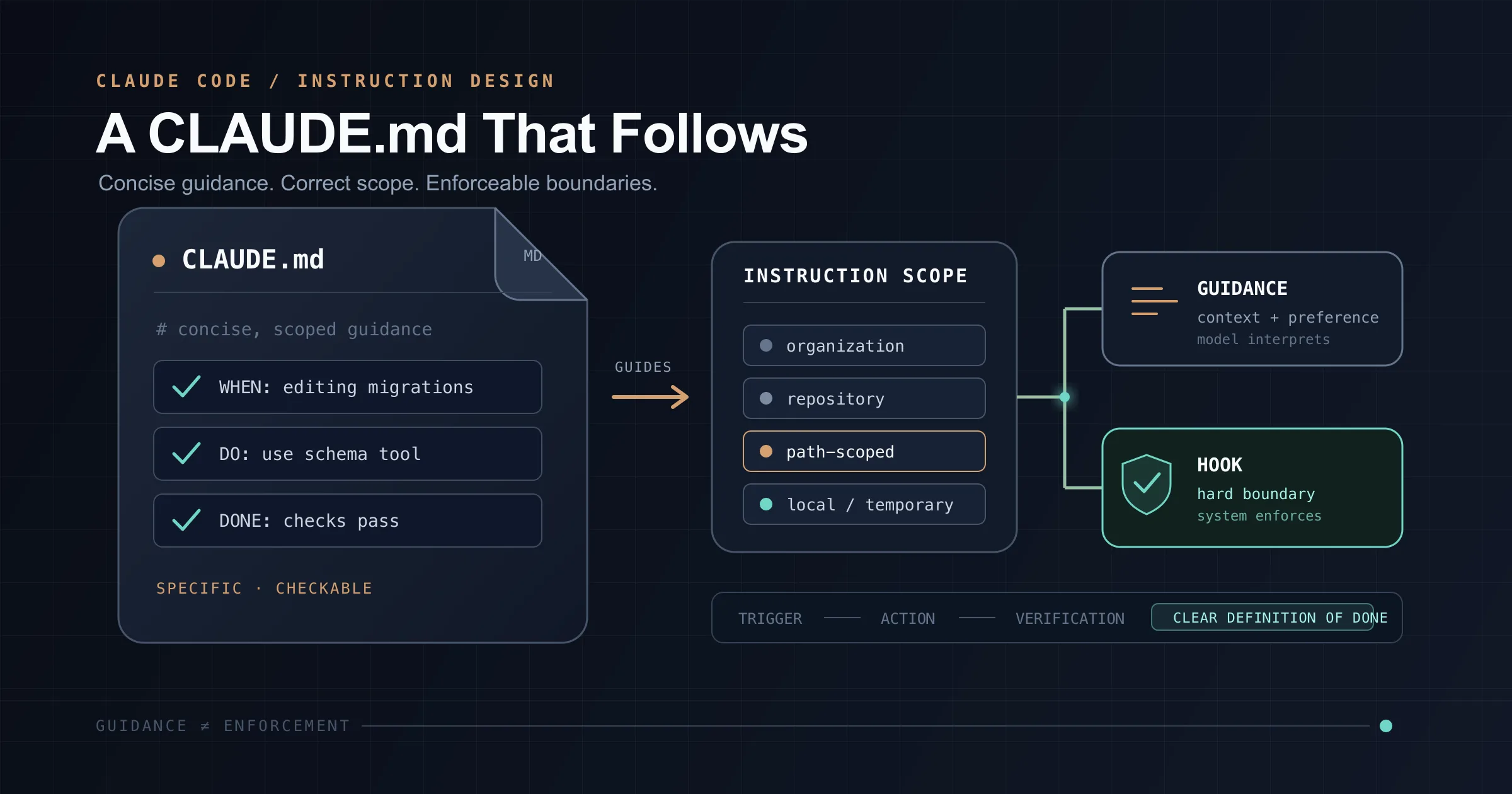
There is a trap that catches almost every team using Claude Code: the CLAUDE.md file keeps growing.
Claude makes a mistake, so you add a rule. A different task exposes another problem, so you add another rule. Then someone adds architecture notes, a deployment checklist, testing instructions, API documentation, and a few warnings written in all caps.
Before long, the file has become a second handbook for the repository. It contains useful information, but Claude follows it less consistently than it followed the smaller version.
That is not necessarily a Claude Code defect. It is a context-design problem.
A CLAUDE.md file is not an executable policy engine. Claude Code loads its contents into the model's context as instructions. Every relevant line consumes context and contributes to the signal Claude must interpret. As the file becomes longer, repetitive, contradictory, or less relevant, the important instructions become harder to distinguish from everything around them.
Anthropic currently recommends keeping each CLAUDE.md concise, well structured, and ideally below roughly 200 lines. The target is not a magical line limit. The goal is a high signal-to-noise ratio.
The best CLAUDE.md is therefore not the one that documents everything. It is the smallest file that gives Claude the durable context it cannot reliably infer from the repository.
CLAUDE.md Is Guidance, Not Enforcement
The most important distinction is simple:
CLAUDE.md influences what Claude decides to do. It does not technically prevent Claude from doing something else. This makes it suitable for conventions such as:
- Put API handlers in
src/api/handlers/. - Use named exports instead of default exports.
- Run
uv run pytestfor backend tests. - Keep domain logic out of HTTP route handlers.
- Match the error response format used in
src/api/errors.py.
These are behavioral instructions. Claude should know them during ordinary development, but the operating system does not need to reject a tool call when one is missed.
Other rules are different:
- Never push directly to
main. - Never modify production credentials.
- Never edit generated files.
- Never run destructive database commands.
- Never access paths outside the repository.
Those are controls. If violating a rule could damage production, expose secrets, or bypass a required workflow, natural-language guidance is not enough.
Use an enforcement mechanism instead:
- Claude Code permission rules for tool, command, or path restrictions.
- A
PreToolUsehook for context-aware validation before a tool executes. - Repository branch protection or rulesets for server-side Git enforcement.
- CI checks for build, test, security, and policy validation.
- Filesystem, container, and cloud IAM controls for infrastructure boundaries.
You may still repeat a critical restriction in CLAUDE.md so Claude understands the intended workflow. The actual protection, however, should exist outside the prompt.
Choose the Right Mechanism Before Adding a Rule
A growing CLAUDE.md often means several different jobs have been pushed into one file.
Use this decision table before adding another section:
| Requirement | Best mechanism | Why |
|---|---|---|
| Context needed in almost every session | CLAUDE.md | Always available to Claude |
| Instructions for particular paths or file types | .claude/rules/ with paths | Loads only when matching files are involved |
| A reusable multi-step procedure | Claude Code skill | Loaded or invoked when relevant |
| A command or action that must be blocked | Permission rule or PreToolUse hook | Enforced before execution |
| A result that must be validated | Tests, linters, CI, or PostToolUse hook | Checks the actual output |
| Personal preferences for every repository | ~/.claude/CLAUDE.md | Follows one user across projects |
| Personal notes for one repository | CLAUDE.local.md | Remains local and can be gitignored |
| Patterns Claude discovers while working | Auto memory | Maintained separately from team instructions |
This separation is the foundation of a maintainable Claude Code setup.
Put Hard Boundaries in Hooks
Consider the instruction:
Never push directly to main.
Inside CLAUDE.md, that is a request. Claude will usually respect it, but "usually" is not an acceptable control for an important branch.
A PreToolUse hook can inspect a pending Bash command and reject it before execution. The following example blocks pushes while the local branch or configured upstream is main, and it also checks for an explicit main ref in the command.
Create .claude/hooks/block-main-push.sh:
#!/usr/bin/env bash
set -euo pipefail

input="$(cat)"
command="$(jq -r '.tool_input.command // ""' <<<"$input")"
cwd="$(jq -r '.cwd // "."' <<<"$input")"

# Ignore Bash calls that do not invoke `git push`.
if ! grep -Eq '(^|[;&|()[:space:]])git[[:space:]]+push([[:space:]]|$)' <<<"$command"; then
  exit 0
fi

current_branch="$(git -C "$cwd" branch --show-current 2>/dev/null || true)"
upstream="$(git -C "$cwd" rev-parse --abbrev-ref --symbolic-full-name '@{u}' 2>/dev/null || true)"

explicit_main_target=false

if grep -Eq '(^|[[:space:]])([^[:space:]]*:)?(refs/heads/)?main([[:space:]]|$)' <<<"$command"; then
  explicit_main_target=true
fi

if [[ "$current_branch" == "main" ]] ||
   [[ "$upstream" == */main ]] ||
   [[ "$explicit_main_target" == true ]]; then
  echo "Blocked: pushing directly to main is not allowed. Push a feature branch and open a pull request." >&2
  exit 2
fi

exit 0
Make it executable:
chmod +x .claude/hooks/block-main-push.sh
Register it in .claude/settings.json:
{
  "hooks": {
    "PreToolUse": [
      {
        "matcher": "Bash",
        "hooks": [
          {
            "type": "command",
            "command": "\"$CLAUDE_PROJECT_DIR\"/.claude/hooks/block-main-push.sh"
          }
        ]
      }
    ]
  }
}
For a PreToolUse command hook, exit code 2 blocks the tool call and sends the message from standard error back to Claude. Claude can then adjust its plan instead of executing the rejected command.
This is still a local guardrail. Shell aliases, unusual Git invocations, or a modified hook can create gaps. Protect main on the Git server as well, require pull requests where appropriate, and treat the hook as a fast local layer in a defense-in-depth setup.
Understand the Four Instruction Scopes
CLAUDE.md is not limited to one project-root file. Claude Code supports four main instruction scopes.
| Scope | Typical location | Purpose |
|---|---|---|
| Managed policy | OS-specific managed location | Organization-wide instructions controlled by IT or platform teams |
| User | ~/.claude/CLAUDE.md | Personal conventions used across all projects |
| Project | ./CLAUDE.md or ./.claude/CLAUDE.md | Shared repository instructions committed for the team |
| Local | ./CLAUDE.local.md | Personal instructions for one repository, normally gitignored |
The managed policy locations are platform-specific:
- macOS:
/Library/Application Support/ClaudeCode/CLAUDE.md - Linux and WSL:
/etc/claude-code/CLAUDE.md - Windows:
C:\Program Files\ClaudeCode\CLAUDE.md
Claude Code reads these scopes from broadest to most specific. Project instructions therefore appear after user instructions, and CLAUDE.local.md is appended after CLAUDE.md at the same directory level.
Files do not override one another like ordinary configuration keys. Their contents are combined in context. That means contradictory instructions remain contradictory. A more specific file may receive more practical weight because it appears later, but you should not depend on ordering to resolve a policy conflict. Remove the conflict instead.
There is another important detail for large repositories: files at and above the working directory load at session start, while instruction files in subdirectories are loaded when Claude works with files in those directories. This allows a monorepo to keep component-specific context closer to the component instead of placing everything in the root file.
Use Local Instructions for Temporary Repository Context
CLAUDE.local.md is useful when a rule matters to you but should not affect the rest of the team.
For example:
# Current Refactor

- Keep the public billing API unchanged.
- Migrate one adapter at a time.
- Use the fixtures in `tests/billing/refactor/`.
- Do not edit the legacy adapter unless a characterization test fails.
Add it to .gitignore:
CLAUDE.local.md
This keeps temporary branch-specific or developer-specific context out of the shared project instructions.
Imports Organize Context; They Do Not Reduce It
A large project file can be divided with @path/to/file imports:
# Project Instructions

@.claude/conventions/code-style.md
@.claude/conventions/testing.md
@.claude/conventions/workflow.md
Imports are valuable because they:
- Keep topics in separate files.
- Make ownership and review easier.
- Reduce merge conflicts.
- Allow shared instruction files to be reused.
- Make a large rule set easier for humans to maintain.
However, imports do not make the startup context smaller. Claude Code expands imported content and loads it alongside the file that referenced it. You have reorganized the same instructions, not made them conditional.
A few details matter:
- Relative imports resolve from the file containing the import.
- Absolute paths and home-directory paths are supported.
- Imports can be recursive, currently up to four hops.
- Import syntax inside inline code or fenced code blocks is ignored.
- Project imports that resolve outside the working directory require approval the first time.
Use imports for maintainability, not token reduction.
Use Path-Scoped Rules to Reduce Always-Loaded Context
When instructions apply only to one area of the repository, .claude/rules/ is usually better than an unconditional import.
For example, create .claude/rules/api-development.md:
---
paths:
  - "src/api/**/*.ts"
  - "tests/api/**/*.test.ts"
---

# API Development

- Validate request input with the shared schema layer.
- Return errors through `src/api/errors.ts`.
- Add an authorization check to every non-public endpoint.
- Add or update an API test for each behavior change.
Because the rule is path-scoped, it becomes relevant when Claude works with matching files rather than adding API instructions to every unrelated task.
Use this pattern for areas such as:
- Frontend component conventions.
- Database migrations.
- Infrastructure-as-code files.
- Security-sensitive modules.
- Test fixtures.
- Generated code.
- Documentation.
- Language-specific rules in polyglot repositories.
Rules without paths frontmatter are still loaded unconditionally. Splitting a file into .claude/rules/ only reduces context when the rules are actually scoped.
Phrase Rules So They Can Be Verified
Once a rule belongs in CLAUDE.md, wording determines how useful it is.
Be Specific and Checkable
Avoid instructions that describe a general aspiration:
Follow best practices for API routes.
Use a result that can be inspected:
Put each new API route in `src/api/handlers/`, one route per file.
The second rule defines both location and granularity. A reviewer can verify it immediately.
Other examples:
| Weak instruction | Strong instruction |
|---|---|
| Write clean code. | Keep functions below one responsibility; extract repeated logic used in three or more places. |
| Test your changes. | Run uv run pytest tests/api after changing an API handler. |
| Handle errors properly. | Convert domain errors through src/api/error_mapper.py; do not construct HTTP error bodies in services. |
| Keep files organized. | Put new domain services in src/domain/services/. |
| Use secure defaults. | New endpoints require authentication unless listed in PUBLIC_ROUTES. |
| Do not add dependencies unnecessarily. | Use the standard library or an existing dependency unless the task explicitly requires a new package. |
Name the Replacement
A prohibition without an alternative leaves an open design decision.
Weak:
Do not use default exports.
Better:
Use named exports, not default exports.
Weak:
Do not call the database from route handlers.
Better:
Call application services from route handlers; keep database access in repository classes.
The replacement tells Claude how to continue after respecting the restriction.
Include the Trigger
A rule is easier to apply when it says when it matters.
Instead of:
Run the integration tests.
Write:
After changing authentication, permissions, or database transactions, run `make test-integration`.
Instead of:
Update documentation.
Write:
When a public API contract changes, update the matching OpenAPI example in `docs/api/`.
Define What Done Means
Completion criteria reduce back-and-forth:
A backend change is complete when:
- Relevant unit tests pass.
- `ruff check .` passes.
- Public behavior is covered by a test.
- No unrelated files are changed.
This is more useful than telling Claude to "make sure everything works."
Avoid Contradictions and Duplication
A rule repeated in five files is not five times stronger. It is five places that can drift.
Search all instruction sources when revising a convention:
- Managed instructions.
~/.claude/CLAUDE.md.- Root and ancestor
CLAUDE.mdfiles. CLAUDE.local.md..claude/rules/.- Imported files.
- Nested repository instructions.
If two sources disagree about test commands, file layout, or export style, Claude may choose the wrong one. Keep one authoritative version whenever possible.
Treat Emphasis as a Budget
Words such as IMPORTANT, MUST, NEVER, and CRITICAL can help distinguish a small number of high-priority instructions. They stop helping when every section uses them.
Compare:
IMPORTANT: You MUST ALWAYS run tests.
IMPORTANT: You MUST NEVER use default exports.
IMPORTANT: You MUST ALWAYS update documentation.
IMPORTANT: You MUST ALWAYS follow best practices.
With:
Before completing a change, run the relevant test command.

CRITICAL: Never use production credentials in tests.
The second version gives the genuinely dangerous rule a clear visual priority.
Reserve strong emphasis for the two or three instructions whose violation creates substantial risk. Use ordinary, precise language for everything else.
A Lean Project CLAUDE.md Example
A useful project file can be short:
# Project

This repository contains a FastAPI service for organization and license
management. HTTP routes call application services, which use repository
interfaces for persistence.

## Commands

- Install dependencies: `uv sync`
- Run the API: `uv run fastapi dev src/main.py`
- Run tests: `uv run pytest`
- Lint: `uv run ruff check .`
- Format: `uv run ruff format .`

## Architecture

- Routes: `src/api/routes/`
- Application services: `src/application/`
- Domain models: `src/domain/`
- Database adapters: `src/infrastructure/database/`
- Tests mirror the source structure under `tests/`.

## Conventions

- Use async functions for I/O-bound service and repository operations.
- Route handlers call application services; they do not query the database.
- Map domain exceptions through `src/api/error_handlers.py`.
- Use existing Pydantic response models instead of returning ad hoc dictionaries.
- Add a regression test when fixing a bug.

## Completion

Before finishing:
- Run the narrowest relevant test suite.
- Run `uv run ruff check .`.
- Report tests that were not run and explain why.
- Do not change unrelated files.
This file gives Claude durable information that would otherwise require repeated explanation. It does not duplicate the complete architecture documentation, explain every package, or include procedures that matter only to one task.
What Does Not Belong in the Root File
Remove or relocate content that is:
Obvious from the repository
Claude can inspect package.json, pyproject.toml, directory names, and nearby code. Do not spend permanent context restating every dependency or copying the file tree.
Include only the parts that are surprising, ambiguous, or easy to misuse.
Full reference documentation
Do not paste entire API specifications, database schemas, or framework documentation into CLAUDE.md. Point Claude to the authoritative file when necessary:
The public API contract is defined in `openapi.yaml`; update it with every public API change.
Historical explanation
A long story about why the architecture evolved is useful in an architecture decision record, not in always-loaded instructions.
Keep the operative decision:
Use the outbox pattern for domain events; do not publish directly inside database transactions.
Link to the ADR for the reasoning:
See `docs/adr/0017-transactional-outbox.md` before changing this pattern.
Temporary task state
Current sprint notes, experimental branch decisions, and one-off migration instructions belong in a task description, plan, issue, local file, or skill.
Aspirational standards
Do not instruct Claude to follow a convention that the repository itself routinely violates unless the instruction defines a migration boundary.
Bad:
All code follows hexagonal architecture.
Better:
New billing code uses ports and adapters. Do not refactor unrelated legacy modules solely to match this pattern.
Hard controls without enforcement
A warning in CLAUDE.md can explain policy, but it should not be the only layer preventing a destructive action.
Keep the File Under Revision
Treat CLAUDE.md like production code:
- Review changes.
- Remove stale statements.
- Test whether instructions produce the intended behavior.
- Avoid duplicated ownership.
- Keep scope explicit.
- Refactor when the file becomes difficult to understand.
A practical maintenance loop looks like this:
- Claude makes an unexpected choice.
- Determine whether the cause was missing context, a vague rule, a conflicting rule, or a missing control.
- Put the fix in the correct mechanism.
- Make the smallest change that prevents recurrence.
- Verify the instruction or enforcement layer works.
Do not automatically add a rule after every mistake. First ask:
- Would Claude need this in most sessions?
- Can Claude infer it from the code?
- Is the instruction specific enough to verify?
- Does it belong to a particular path?
- Is it a repeatable procedure better expressed as a skill?
- Is it actually a hard restriction that should be enforced?
- Does an existing rule already cover it?
- Will the rule still be true in six months?
Anthropic's guidance suggests adding durable context when Claude repeats the same mistake or when a code review reveals something it should have known. That is a better threshold than treating every isolated error as a permanent instruction.
You can ask Claude to remember a rule or edit it through /memory. You can also use /context to verify which memory files were loaded. However the same review standard should apply as with any other code change: inspect what was added, tighten the wording, and remove duplication.
A quarterly audit is often enough for a stable repository:
- Delete outdated commands.
- Remove conventions already enforced by tooling.
- Resolve contradictions.
- Move path-specific material into scoped rules.
- Move repeatable procedures into skills.
- Move hard restrictions into permissions, hooks, CI, or server policy.
- Remove documentation Claude can discover directly.
- Check whether the root file is still below the team's chosen size target.
The Bottom Line
A reliable Claude Code setup is not built by putting every instruction into one increasingly large file.
Keep CLAUDE.md for concise, durable, always-relevant guidance. Use the rest of the Claude Code configuration model for the jobs it handles better:
- Use managed, user, project, and local scopes deliberately.
- Use imports to organize instructions, not to reduce loaded context.
- Use path-scoped
.claude/rules/files when instructions are conditional. - Use skills for reusable procedures.
- Use permissions and
PreToolUsehooks for local enforcement. - Use CI, branch protection, IAM, and platform controls for authoritative enforcement.
- Write rules that are specific, checkable, and paired with a replacement.
- Reserve emphasis for the few instructions that genuinely deserve it.
- Revise the file whenever repeated failures reveal a real gap.
The central idea is simple: the leaner and more relevant the instruction set, the more reliably Claude can follow it.
References
- Anthropic: How Claude remembers your project - code.claude.com/docs/en/memory
- Anthropic: Automate actions with hooks - code.claude.com/docs/en/hooks-guide
- Anthropic: Give Claude context: CLAUDE.md and better prompts - support.claude.com/en/articles/14553240-give-claude-context-claude-md-and-better-prompts
- GitHub: About protected branches - docs.github.com/en/repositories/configuring-branches-and-merges-in-your-repository/managing-protected-branches/about-protected-branches