
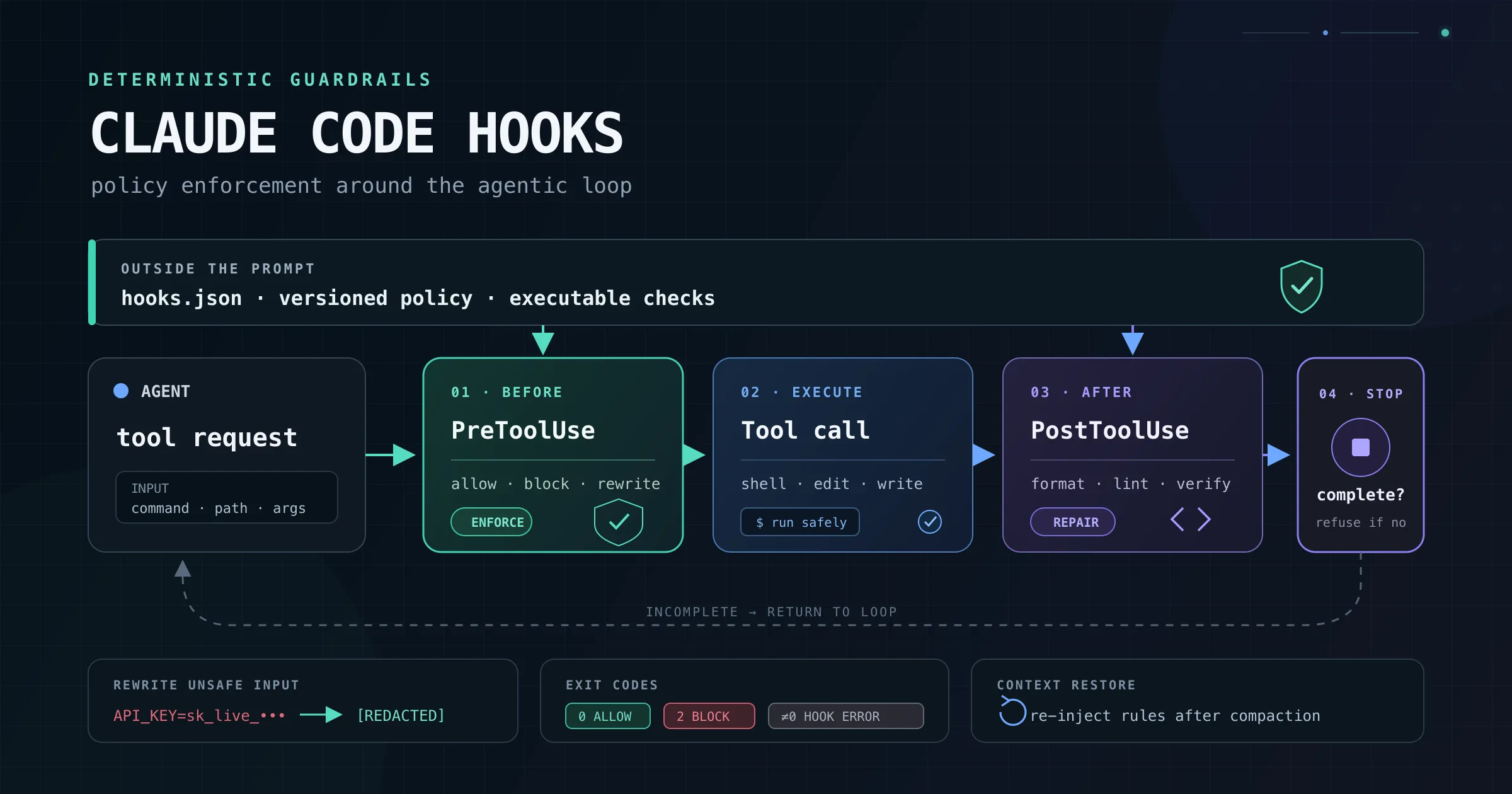
Here is the problem with putting an instruction in CLAUDE.md: it is guidance, not enforcement.
You can write:
Always run the formatter after editing a file.
Claude will usually follow it. On a short, supervised task, usually may be enough. On a long autonomous run, it is not. Claude can overlook the instruction, lose it during context compaction, or decide that another action is more important.
A hook changes the nature of the rule. Instead of asking the model to remember an action, you attach executable logic to a fixed point in the Claude Code lifecycle.
A PostToolUse hook can run the formatter after every successful edit. A PreToolUse hook can inspect or block a command before it executes. A Stop hook can refuse to let Claude finish while tests are failing.
That is the core value of hooks:
CLAUDE.md describes what Claude should do. Hooks control what the surrounding runtime actually does. Hooks are deterministic automation, but they are not automatically safe or infallible. A badly written hook can fail open, modify the wrong file, or run a dangerous command with your own permissions. The guarantee comes from placing well-tested code at the correct lifecycle event and making policy hooks fail closed.
Where hooks fit in the agentic loop
The current Claude Code hook reference documents 30 events across the session lifecycle. You do not need to memorize all of them.
Most practical hook setups are built around a much smaller group:
| Event | When it fires | Typical use |
|---|---|---|
SessionStart | When a session starts, resumes, clears, forks, or continues after compaction | Inject repository state, configure environment variables, restore working context |
UserPromptSubmit | After the user submits a prompt but before Claude processes it | Add dynamic context or reject invalid prompts |
PreToolUse | Before a tool call executes | Allow, deny, escalate, or rewrite a tool call |
PermissionRequest | When a tool call requires a permission decision | Automate approvals for narrowly defined safe operations |
PostToolUse | After a tool call succeeds | Format files, run focused lint checks, record audit events |
PostToolUseFailure | After an executed tool fails | Add corrective context, collect diagnostics, alert external systems |
SubagentStop | When a subagent finishes | Validate subagent output before accepting completion |
Stop | When Claude wants to finish its turn | Run tests or refuse completion while required checks fail |
PreCompact | Before manual or automatic compaction | Save state or block compaction |
PostCompact | After compaction completes | Log or inspect the generated compact summary |
InstructionsLoaded | When CLAUDE.md or a rule file enters context | Audit which instructions were actually loaded |
The lifecycle is roughly:
SessionStart
    |
UserPromptSubmit
    |
PreToolUse
    |
tool executes
    |
PostToolUse or PostToolUseFailure
    |
Claude continues or calls more tools
    |
Stop
Compaction, subagents, permissions, notifications, task tracking, worktrees, MCP elicitation, configuration changes, and other events add more interception points around that basic loop.
Hooks are configured outside the prompt
Hooks normally live in a Claude Code settings file.
| Location | Scope | Usually committed |
|---|---|---|
~/.claude/settings.json | Every project for the current user | No |
.claude/settings.json | One repository | Yes |
.claude/settings.local.json | One repository on one machine | No |
| Managed policy settings | Organization-wide | Administrator-controlled |
Plugin hooks/hooks.json | Wherever the plugin is enabled | Bundled with the plugin |
| Skill or agent frontmatter | While that component is active | Usually yes |
A project-level hook has this general shape:
{
  "hooks": {
    "PreToolUse": [
      {
        "matcher": "Bash",
        "hooks": [
          {
            "type": "command",
            "command": "${CLAUDE_PROJECT_DIR}/.claude/hooks/check-bash.py"
          }
        ]
      }
    ]
  }
}
The outer key is the event. The matcher narrows the event, such as matching only the Bash tool or either Edit or Write. The inner hooks array contains the handlers that Claude Code runs.
The most common handler is a command hook, but current Claude Code versions also support:
command: run a local process.http: send the event payload to an HTTP endpoint.mcp_tool: call a tool from an already connected MCP server.prompt: ask a model for a single-turn yes-or-no decision.agent: run a tool-using verification subagent.
Only the command, HTTP service, or MCP implementation can be deterministic in the strict sense. Prompt and agent hooks are useful for judgment-heavy checks, but they still depend on model behavior.
What a hook receives
For command hooks, Claude Code writes a JSON event object to standard input. The exact fields depend on the event.
A PreToolUse event for Bash looks conceptually like this:
{
  "session_id": "abc123",
  "cwd": "/home/user/project",
  "hook_event_name": "PreToolUse",
  "tool_name": "Bash",
  "tool_input": {
    "command": "pytest -q",
    "description": "Run the test suite"
  },
  "tool_use_id": "toolu_01ABC123"
}
Do not construct shell commands by directly interpolating untrusted values from this object. Parse the JSON with jq, Python, Node.js, or another real parser, preserve quoting, and validate paths before using them.
PreToolUse: the enforcement primitive
PreToolUse is the most important event for guardrails because it fires before the selected tool runs.
A command hook can exit with code 2 to block the call, or it can exit successfully and print structured JSON for finer control.
For PreToolUse, the decision belongs inside hookSpecificOutput:
{
  "hookSpecificOutput": {
    "hookEventName": "PreToolUse",
    "permissionDecision": "deny",
    "permissionDecisionReason": "Production deployment commands are blocked from this project."
  }
}
The available decisions are:
| Decision | Effect |
|---|---|
allow | Approve the tool call without the normal permission prompt, subject to remaining permission rules and tools that always require interaction |
deny | Prevent the tool call from executing |
ask | Show the user a permission prompt |
defer | Pause a tool call in supported non-interactive -p workflows so another process can resume it later |
Most interactive workflows use allow, deny, or ask.
Rewriting tool input
A PreToolUse hook can also return updatedInput. Claude Code then runs the tool with the replacement input rather than the original arguments.
{
  "hookSpecificOutput": {
    "hookEventName": "PreToolUse",
    "permissionDecision": "allow",
    "permissionDecisionReason": "A credential-like value was redacted before execution.",
    "updatedInput": {
      "command": "curl -H 'Authorization: Bearer [REDACTED]' https://api.example.test",
      "description": "Call the test API"
    }
  }
}
The important detail is that updatedInput replaces the entire tool input object. It is not a partial patch. If the original input contained description, timeout, run_in_background, or another field, preserve that field unless you intentionally want to remove it.
A practical guardrail: redact a secret instead of only blocking
Blocking a dangerous command is useful, but input rewriting enables a more nuanced pattern.
Suppose Claude prepares a Bash command containing a live-looking payment API key. A hook can replace the secret before the shell ever sees the command.
Create .claude/hooks/redact-bash-secrets.py:
#!/usr/bin/env python3
from __future__ import annotations

import json
import re
import sys
from typing import Any


SECRET_PATTERNS: tuple[tuple[re.Pattern[str], str], ...] = (
    (
        re.compile(r"sk_live_[A-Za-z0-9_-]{16,}"),
        "sk_live_[REDACTED]",
    ),
    (
        re.compile(
            r"(?i)(authorization:\s*bearer\s+)[A-Za-z0-9._~+/=-]{16,}"
        ),
        r"\1[REDACTED]",
    ),
)


def load_payload() -> dict[str, Any]:
    payload = json.load(sys.stdin)

    if not isinstance(payload, dict):
        raise ValueError("Hook input must be a JSON object.")

    return payload


def redact(command: str) -> str:
    result = command

    for pattern, replacement in SECRET_PATTERNS:
        result = pattern.sub(replacement, result)

    return result


def main() -> int:
    try:
        payload = load_payload()
        tool_input = payload.get("tool_input")

        if not isinstance(tool_input, dict):
            raise ValueError("Missing tool_input object.")

        command = tool_input.get("command")

        if not isinstance(command, str):
            raise ValueError("Missing Bash command.")

        redacted_command = redact(command)

        if redacted_command == command:
            # No structured output means the normal permission flow continues.
            return 0

        # updatedInput replaces the whole input object, so copy every field.
        updated_input = dict(tool_input)
        updated_input["command"] = redacted_command

        result = {
            "hookSpecificOutput": {
                "hookEventName": "PreToolUse",
                "permissionDecision": "allow",
                "permissionDecisionReason": (
                    "Credential-like text was redacted before execution."
                ),
                "updatedInput": updated_input,
            }
        }

        json.dump(result, sys.stdout)
        return 0
    except (json.JSONDecodeError, OSError, ValueError) as error:
        # Policy hooks should fail closed.
        print(f"Secret-redaction hook failed: {error}", file=sys.stderr)
        return 2


if __name__ == "__main__":
    raise SystemExit(main())
Make it executable:
chmod +x .claude/hooks/redact-bash-secrets.py
Register it:
{
  "hooks": {
    "PreToolUse": [
      {
        "matcher": "Bash",
        "hooks": [
          {
            "type": "command",
            "command": "${CLAUDE_PROJECT_DIR}/.claude/hooks/redact-bash-secrets.py"
          }
        ]
      }
    ]
  }
}
When no secret is present, the script exits successfully without returning a decision, so Claude Code continues through its normal permission flow.
When the script changes the command, it returns the complete replacement input and allows the sanitized call. Replace allow with ask when you want the user to inspect the rewritten command before it runs.
This example is intentionally small. A production secret scanner should cover the credential formats relevant to your organization, include test fixtures, and avoid logging the original secret.
Exit codes: zero, two, and everything else
Not every hook needs structured JSON. Exit codes are enough for many guardrails.
Exit code 0
Exit code 0 means the hook completed successfully.
If standard output contains valid JSON, Claude Code parses it. JSON is processed only when the hook exits with code 0.
For most events, plain-text standard output is not added to Claude's context. The important exceptions are:
SessionStartUserPromptSubmitUserPromptExpansion
For these events, plain text can become context that Claude sees.
Exit code 2
Exit code 2 means a blocking error on events that support blocking.
Standard error becomes the reason Claude or the user receives.
Examples:
- On
PreToolUse, it blocks the tool call. - On
PermissionRequest, it denies permission. - On
Stop, it prevents Claude from stopping. - On
SubagentStop, it keeps the subagent working. - On
PreCompact, it blocks compaction.
Every other non-zero code
For most events, every other non-zero status is a non-blocking hook error. Claude Code logs or displays the error and continues.
This includes exit code 1.
That behavior surprises developers because 1 conventionally means failure in Unix programs. In a Claude Code policy hook, however, 1 usually does not stop the protected action.
If a hook must enforce a rule, use 2, not 1.
if unsafe_condition; then
  echo "Blocked by project policy." >&2
  exit 2
fi

exit 0
Do not print JSON and exit 2 at the same time. Claude Code ignores JSON on a blocking exit and uses standard error as the reason.
PostToolUse: automate what should happen after success
PostToolUse runs after a tool call has already completed successfully.
This is the correct place for:
- Formatting files after edits.
- Running a focused linter.
- Recording successful tool operations.
- Updating generated metadata.
- Adding feedback that Claude should consider before its next action.
A formatter hook might look like this:
{
  "hooks": {
    "PostToolUse": [
      {
        "matcher": "Edit|Write",
        "hooks": [
          {
            "type": "command",
            "command": "${CLAUDE_PROJECT_DIR}/.claude/hooks/format-edited-file.sh"
          }
        ]
      }
    ]
  }
}
Create .claude/hooks/format-edited-file.sh:
#!/usr/bin/env bash
set -euo pipefail

payload="$(cat)"
file_path="$(jq -r '.tool_input.file_path // empty' <<<"$payload")"

if [[ -z "$file_path" ]]; then
  exit 0
fi

case "$file_path" in
  *.js|*.jsx|*.ts|*.tsx|*.json|*.md)
    npx prettier --write -- "$file_path"
    ;;
  *.py)
    uv run ruff format -- "$file_path"
    ;;
esac
Because PostToolUse runs after the edit, it cannot prevent or undo that edit. Even an exit code 2 is too late to stop the original tool call. It can still return feedback to Claude, but the side effect has already happened.
Use PreToolUse when the action itself must be stopped or changed.
Stop: refuse incomplete work
Stop fires when Claude wants to finish responding. A blocking result tells Claude that the turn is not complete and gives it a reason to continue.
A deterministic test gate can be implemented as a command hook:
{
  "hooks": {
    "Stop": [
      {
        "hooks": [
          {
            "type": "command",
            "command": "${CLAUDE_PROJECT_DIR}/.claude/hooks/verify-before-stop.sh",
            "timeout": 120
          }
        ]
      }
    ]
  }
}
Create .claude/hooks/verify-before-stop.sh:
#!/usr/bin/env bash
set -uo pipefail

cd "${CLAUDE_PROJECT_DIR:-.}"

# Do not run the suite when the repository has no local changes.
if [[ -z "$(git status --porcelain 2>/dev/null)" ]]; then
  exit 0
fi

if uv run pytest -q; then
  exit 0
fi

echo "The test suite is failing. Fix the failures and rerun verification before stopping." >&2
exit 2
When tests fail, Claude receives the error and continues working. When they pass, the hook exits 0 and Claude may stop.
There are two operational caveats:
Stopfires whenever Claude finishes responding, not only when it believes an entire project task is complete.- A full test suite on every stop can be slow.
Keep the check focused, add caching or change detection, and use a timeout appropriate for the repository. For more complex verification, a prompt or agent hook can inspect the task, but that changes the check from deterministic code into model-assisted judgment.
Preserving state across compaction
Long Claude Code sessions eventually compact their context. Compaction creates a summary and reloads instruction files, but project-specific working state can still become too vague.
Current Claude Code versions expose two useful mechanisms:
PostCompactreceives the generatedcompact_summary, which is useful for logging, external synchronization, or inspection.SessionStartfires again with the matcher valuecompact, and its plain standard output is added to Claude's context.
That makes SessionStart with compact the correct hook for restoring context that Claude must immediately use.
Register the hook:
{
  "hooks": {
    "SessionStart": [
      {
        "matcher": "compact",
        "hooks": [
          {
            "type": "command",
            "command": "${CLAUDE_PROJECT_DIR}/.claude/hooks/restore-after-compact.sh"
          }
        ]
      }
    ]
  }
}
Create .claude/hooks/restore-after-compact.sh:
#!/usr/bin/env bash
set -euo pipefail

cd "${CLAUDE_PROJECT_DIR:-.}"

echo "Post-compaction working state:"
echo
echo "Git branch:"
git branch --show-current 2>/dev/null || true

echo
echo "Changed files:"
git status --short 2>/dev/null || true

echo
echo "Diff summary:"
git diff --stat 2>/dev/null || true

if [[ -f .claude/session-state.md ]]; then
  echo
  echo "Explicit session state:"
  cat .claude/session-state.md
fi
The script's plain text becomes fresh context after compaction.
For stronger continuity, maintain .claude/session-state.md with information that Git cannot reconstruct:
- The current objective.
- Decisions already made.
- Approaches that were rejected.
- Open questions.
- The next verification step.
- Files that are important but unchanged.
- External dependencies or pending responses.
Add transient state and logs to .gitignore when they may contain private data.
What PostCompact is for
PostCompact now receives the compacted conversation summary:
{
  "hook_event_name": "PostCompact",
  "trigger": "manual",
  "compact_summary": "Summary of the compacted conversation..."
}
That makes it useful for recording compaction history or updating an external memory store. It has no decision control and cannot change the summary that was already created.
Use it for side effects. Use SessionStart with the compact matcher for context re-injection.
InstructionsLoaded: audit what Claude actually received
Large repositories often contain several instruction sources:
- A root
CLAUDE.md. - Nested
CLAUDE.mdfiles. .claude/rules/*.md.- Conditional rules with
paths:frontmatter. - Included instruction files.
InstructionsLoaded fires when one of those files is loaded into context. Its payload identifies the file, scope, and load reason, including:
session_startnested_traversalpath_glob_matchincludecompact
This event cannot block or modify instruction loading. It is designed for observability.
An audit hook can record what was loaded:
{
  "hooks": {
    "InstructionsLoaded": [
      {
        "hooks": [
          {
            "type": "command",
            "command": "jq -r '[now | todateiso8601, .load_reason, .memory_type, .file_path] | @tsv' >> .claude/instructions-loaded.log"
          }
        ]
      }
    ]
  }
}
This is useful when Claude appears to ignore a rule. Before rewriting the rule, verify that the file was actually loaded and why.
Matchers and the if filter
A matcher usually filters an event by a single primary field.
For tool events, it matches the tool name:
{
  "matcher": "Edit|Write"
}
For SessionStart, it matches how the session started:
{
  "matcher": "startup|compact"
}
For InstructionsLoaded, it matches the load reason:
{
  "matcher": "session_start|compact"
}
Tool events can also use an if field to filter by tool name and arguments:
{
  "matcher": "Bash",
  "hooks": [
    {
      "type": "command",
      "if": "Bash(git push *)",
      "command": "${CLAUDE_PROJECT_DIR}/.claude/hooks/check-push.sh"
    }
  ]
}
Treat if as a convenience and performance filter, not as the only security boundary. Command parsing is best effort, and the filter can fail open when Claude Code cannot parse a Bash command.
For important policies, match the broad tool event and let the hook script parse and validate the full input. Combine hooks with Claude Code permission rules, operating-system permissions, sandboxing, protected branches, and server-side controls.
Multiple hooks do not short-circuit
When several hooks match the same event, Claude Code runs every matching handler before combining the results.
A deny from one PreToolUse hook does not stop sibling hooks from running. This matters when another sibling has a side effect such as writing a log, calling an API, or modifying a file.
For PreToolUse, the most restrictive decision wins:
deny > defer > ask > allow
Design sibling hooks so they are independently safe. Do not assume that an earlier policy hook will prevent later handlers from executing.
Asynchronous hooks cannot enforce policy
Command hooks can be marked asynchronous for slow side effects:
{
  "type": "command",
  "command": "${CLAUDE_PROJECT_DIR}/.claude/hooks/send-audit-event.sh",
  "async": true
}
This is appropriate for telemetry, notifications, or external synchronization.
It is not appropriate for a guardrail. An asynchronous hook cannot block or modify an action because Claude Code continues before the hook finishes. Decision fields and exit codes arrive too late.
Any hook that must allow, deny, ask, rewrite, or gate completion must run synchronously.
Security considerations
Hooks execute with the permissions of your operating-system user. A project hook is executable automation, not harmless configuration.
Apply the same review standard you would apply to a build script:
- Read hook code before enabling it.
- Be especially careful with hooks committed by another repository.
- Parse JSON instead of using string concatenation.
- Quote paths and pass
--before untrusted filenames. - Avoid writing secrets or full command payloads to logs.
- Prefer absolute project-relative paths through
${CLAUDE_PROJECT_DIR}. - Give blocking hooks explicit timeouts.
- Test allow, deny, malformed-input, and hook-failure paths.
- Make enforcement hooks fail closed with exit code
2. - Keep side-effect-only hooks separate from policy hooks.
- Do not treat prompt or agent hooks as deterministic security controls.
- Use external controls for irreversible actions such as production deployment, branch protection, credential scope, and destructive infrastructure operations.
Hooks are powerful precisely because Claude cannot choose to skip the configured lifecycle event. That also means a compromised or careless hook can run repeatedly without Claude choosing to stop it.
A practical starter configuration
A useful first setup combines four patterns:
{
  "hooks": {
    "PreToolUse": [
      {
        "matcher": "Bash",
        "hooks": [
          {
            "type": "command",
            "command": "${CLAUDE_PROJECT_DIR}/.claude/hooks/redact-bash-secrets.py"
          }
        ]
      }
    ],
    "PostToolUse": [
      {
        "matcher": "Edit|Write",
        "hooks": [
          {
            "type": "command",
            "command": "${CLAUDE_PROJECT_DIR}/.claude/hooks/format-edited-file.sh"
          }
        ]
      }
    ],
    "Stop": [
      {
        "hooks": [
          {
            "type": "command",
            "command": "${CLAUDE_PROJECT_DIR}/.claude/hooks/verify-before-stop.sh",
            "timeout": 120
          }
        ]
      }
    ],
    "SessionStart": [
      {
        "matcher": "compact",
        "hooks": [
          {
            "type": "command",
            "command": "${CLAUDE_PROJECT_DIR}/.claude/hooks/restore-after-compact.sh"
          }
        ]
      }
    ]
  }
}
This setup gives you:
- A pre-execution guardrail.
- Automatic formatting after edits.
- A verification gate before completion.
- State restoration after context compaction.
Start with one hook, test it in a disposable repository, inspect it through /hooks, and only then expand the configuration.
Wrapping up
A CLAUDE.md rule asks Claude to remember. A hook attaches code to the runtime.
Use PreToolUse when an action must be inspected, denied, escalated, or rewritten before execution. Use PostToolUse for formatting and other after-success automation. Use Stop to prevent premature completion. Use SessionStart with the compact matcher to restore operational context after compaction, and use PostCompact to observe or archive the compacted summary.
The strongest hook setups are not the largest. They encode a few high-value invariants:
- Secrets do not reach commands.
- Dangerous operations require explicit approval.
- Edited files are formatted.
- Tests must pass before work is declared complete.
- Critical state survives compaction.
That is where hooks pay for themselves: not when everything goes as expected, but when they catch the one skipped step during a long run you were not watching.
References
- Anthropic: Hooks reference - code[.]claude.com/docs/en/hooks
- Anthropic: Automate actions with hooks - code[.]claude.com/docs/en/hooks-guide
- Anthropic: Claude Code power user customization: How to configure hooks - claude[.]com/blog/how-to-configure-hooks