
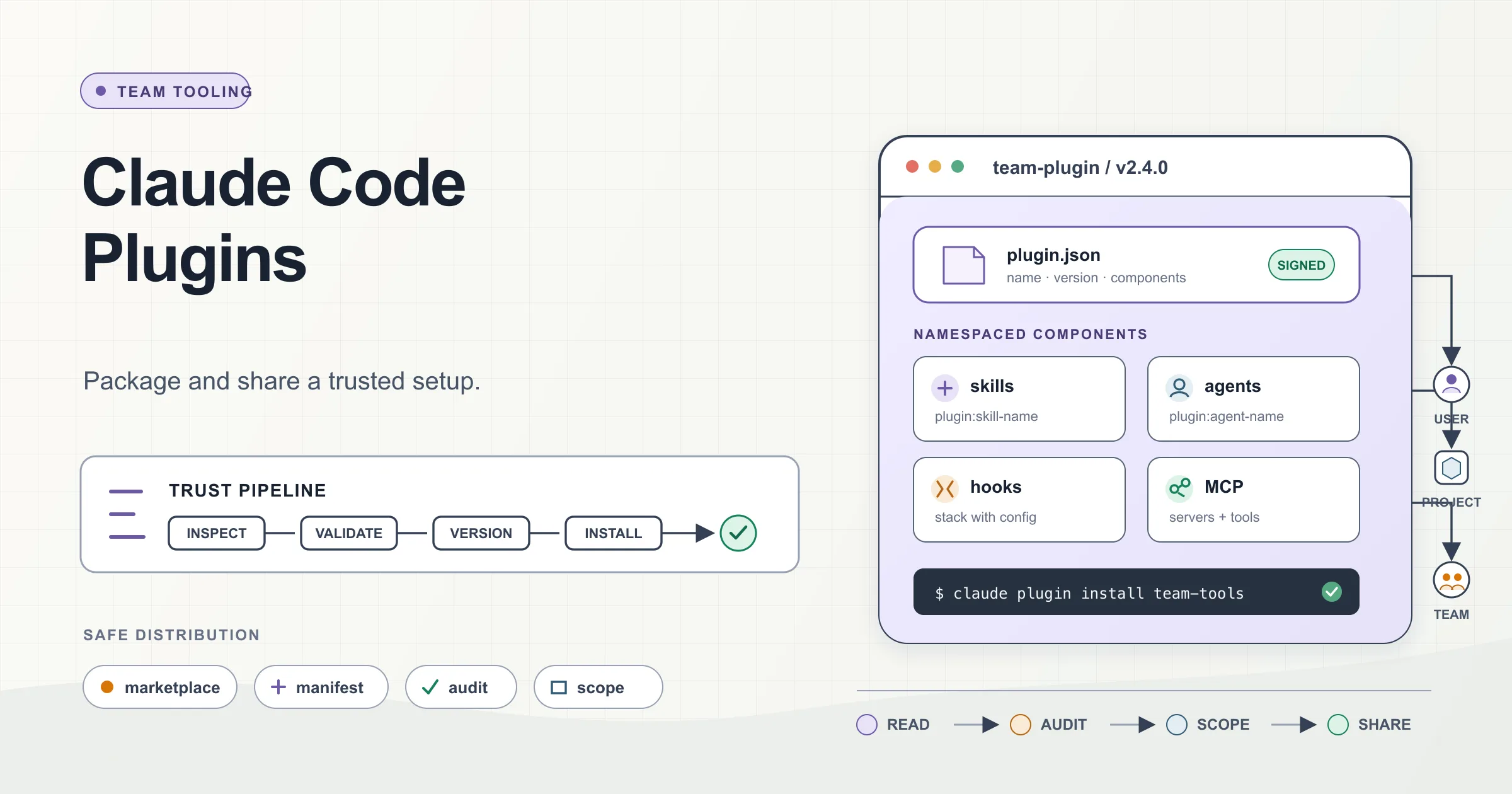
A Claude Code setup becomes much more valuable when the whole team can use it.
The problem is distribution. You build a useful collection of skills, subagents, hooks, and MCP server configurations in .claude/, but then everyone starts copying files between repositories and machines. One developer has the latest hook. Another still has the version from two weeks ago. Someone fixes a skill locally and forgets to share the change.
Plugins solve that problem.
A plugin packages Claude Code extensions into one installable, versioned unit. Instead of asking teammates to reproduce your setup by hand, you give them a marketplace and a plugin name. They install it once, and Claude Code loads the same components for everyone.
There are two sides to the workflow:
- Installing plugins created by Anthropic, your team, or the community.
- Packaging and distributing your own setup once it is worth sharing.
The mechanics are simple. The trust model deserves more attention.
What a Claude Code plugin is
A plugin is a self-contained directory that can bundle several kinds of Claude Code extensions:
| Component | Default location | What it adds |
|---|---|---|
| Skills | skills/<name>/SKILL.md | Reusable instructions and workflows |
| Commands | commands/*.md | Flat Markdown skills, mainly for older plugin layouts |
| Subagents | agents/*.md | Specialized agents with their own prompts, tools, and models |
| Hooks | hooks/hooks.json | Deterministic handlers for Claude Code events |
| MCP servers | .mcp.json | Connections to tools and external systems |
| LSP servers | .lsp.json | Code intelligence through language servers |
| Output styles | output-styles/*.md | Alternative response behavior and formatting |
| Background monitors | monitors/monitors.json | Processes that watch logs, files, or external status |
| Themes | themes/*.json | Custom terminal color themes |
| Executables | bin/ | Commands added to the Bash tool's PATH while enabled |
| Default settings | settings.json | A limited set of plugin-level defaults |
That is the main benefit: one version, one installation, and one update path.
A marketplace is different. It is only a catalog that tells Claude Code which plugins exist and where their source code lives. Adding a marketplace does not install all its plugins. It makes those plugins discoverable so users can choose which ones to install.
Think of it this way:
A marketplace is the catalog. A plugin is the package that actually runs.
Installing a plugin
Claude Code registers Anthropic's official marketplace, claude-plugins-official, automatically during the first interactive startup in most environments.
You can browse available plugins by opening the plugin manager:
/plugin
The interface includes tabs for discovering plugins, inspecting installed plugins, managing marketplaces, and reviewing load errors.
To install a plugin directly, use this syntax:
/plugin install plugin-name@marketplace-name
For example:
/plugin install github@claude-plugins-official
The important order is plugin first, marketplace second.
After installation, apply the new components to the current session:
/reload-plugins
You can also manage plugins outside an interactive Claude Code session:
claude plugin install formatter@company-tools
claude plugin list
claude plugin disable formatter@company-tools
claude plugin enable formatter@company-tools
claude plugin uninstall formatter@company-tools
The interactive and command-line forms manage the same plugin configuration. The CLI form is useful in setup scripts, development containers, and CI images.
Choose the right installation scope
Plugin installation has three normal scopes:
| Scope | Stored in | Best use |
|---|---|---|
| User | ~/.claude/settings.json | A plugin you want in every project |
| Project | .claude/settings.json | A plugin the repository expects every collaborator to use |
| Local | .claude/settings.local.json | A plugin only you want in the current repository |
The default is user scope.
From the CLI, make the scope explicit when needed:
# Available in every project for the current user
claude plugin install formatter@company-tools --scope user

# Shared through the repository's .claude/settings.json
claude plugin install formatter@company-tools --scope project

# Available only to the current user in this repository
claude plugin install formatter@company-tools --scope local
Project scope is useful, but it is not a silent deployment mechanism. A repository can declare a marketplace and enable plugins in .claude/settings.json, but each collaborator still encounters the workspace trust and installation flow before externally sourced plugin code runs.
That is a good boundary. A cloned repository should not be able to execute a new toolchain on a developer's machine without a trust decision.
Add a marketplace for your team
For a private team setup, put your plugins in a Git repository with a marketplace catalog, then add that marketplace once:
/plugin marketplace add your-org/claude-plugins
After that, plugins from the marketplace use the marketplace's declared name:
/plugin install svg-splitter-review@company-tools
You can browse the catalog from the Discover tab instead of memorizing plugin names.
A marketplace can come from several source types:
- A GitHub repository using
owner/repo. - A full Git URL for GitLab, Bitbucket, or a self-hosted server.
- A local directory during development.
- A direct URL to a hosted
marketplace.jsonfile.
For a private GitLab repository, for example:
/plugin marketplace add https://gitlab.example.com/devtools/claude-plugins.git
A team can also declare the marketplace in the repository's .claude/settings.json:
{
  "extraKnownMarketplaces": {
    "company-tools": {
      "source": {
        "source": "github",
        "repo": "your-org/claude-plugins"
      }
    }
  },
  "enabledPlugins": {
    "svg-splitter-review@company-tools": true,
    "security-checks@company-tools": true
  }
}
When a teammate trusts the repository, Claude Code can guide them through installing the declared marketplace and plugins.
This gives the team centralized discovery and a shared default without relying on a setup document that everyone must follow manually.
Read before you install
A plugin is not passive content.
Plugins and marketplaces are highly trusted components. They can execute arbitrary code on your machine with your user privileges. Hooks can launch commands when matching Claude Code events occur. MCP servers can connect to external systems. Background monitors can start automatically. A plugin can add executables to the environment Claude uses for Bash.
That makes plugin review similar to dependency review, not theme installation.
The plugin details pane can show:
- Skills, commands, and agents that will be installed.
- Hook definitions.
- MCP and LSP servers.
- Estimated context cost.
- Last updated information.
- Other components discovered from the package.
Use that information before enabling the plugin.
A practical pre-install audit
Start with the components that can execute code or cross a trust boundary.
1. Inspect every hook
Look for:
PreToolUse,PostToolUse,Stop,SessionStart, and other automatic events.- Shell commands or scripts the hook launches.
- Network clients such as
curl,wget, or custom HTTP code. - File writes outside the project directory.
- Commands that read environment variables, credential files, SSH configuration, or cloud CLI profiles.
- Broad matchers that make a hook run far more often than its description suggests.
A plugin installed for one useful skill may also carry hooks that run independently of that skill.
2. Inspect MCP server definitions
Check:
- Which executable or remote endpoint starts the server.
- Which environment variables it receives.
- Whether credentials are passed safely.
- What tools the server exposes to Claude.
- Whether the server connects to production systems.
- Whether the source is pinned or fetched dynamically.
A preconfigured MCP server is convenient because it removes setup work. It also widens the plugin's effective permissions.
3. Inspect subagents and default settings
Subagents can define:
- A system prompt.
- An allowed or restricted tool set.
- A specific model.
- Specialized behavior for a task.
A plugin can also ship a root-level settings.json. At the time of writing, Claude Code supports only the agent and subagentStatusLine keys from this file.
The agent key deserves particular attention:
{
  "agent": "security-reviewer"
}
This promotes one of the plugin's subagents to the main thread. Its system prompt, tool restrictions, and model become the default behavior while the plugin is enabled.
That is not merely an extra command. It can change how Claude Code behaves for the entire session.
4. Inspect background and external behavior
Look for:
- Monitors that start automatically.
- LSP servers that require local binaries.
- Package installation scripts.
- Commands that download code at runtime.
- Telemetry or analytics endpoints.
- Update mechanisms outside Claude Code's marketplace versioning.
5. Check source ownership and release history
Review:
- Repository owner.
- Recent commits and maintainers.
- Release tags or version changes.
- Open security issues.
- Whether the marketplace pins the plugin to a commit SHA.
- Whether the code shown in the repository matches the version you are installing.
Anthropic's community marketplace performs automated validation and safety screening, and catalog entries are pinned to specific commits. The official marketplace is curated separately. Neither fact removes the need to review what a third-party plugin does.
Reviewed is not the same as trusted.
Components run alongside your configuration
Installing a plugin does not normally overwrite the files in your existing .claude/ directory. Plugin components are loaded alongside your project and user configuration.
That has useful consequences:
- Plugin skills and agents are namespaced, reducing collisions.
- Your own hooks continue to run.
- Project-specific instructions remain separate from shared plugin code.
- Multiple plugins can contribute different capabilities at the same time.
It also creates composition risks.
Hooks stack
If your project and a plugin both define a matching PreToolUse hook, both can run. One does not replace the other.
This can produce:
- Duplicate formatting.
- Conflicting policy checks.
- Additional latency on every tool call.
- Unexpected failures when one hook blocks an operation.
- Repeated network or logging activity.
Review plugins as part of the complete Claude Code execution path, not in isolation.
Skills and agents are namespaced
A plugin named company-review with a review-pr skill is invoked as:
/company-review:review-pr
Namespacing prevents two plugins from fighting over a generic name such as /review.
Agents use the same namespace concept in Claude Code's interfaces. The manifest's name is therefore a compatibility boundary. Renaming it later can break existing installations and settings unless the marketplace provides an explicit rename migration.
Plugins have a context cost
Skills, agents, tools, and other plugin metadata can consume context. The Discover view can estimate the recurring context cost for supported plugins.
That matters for large team bundles. A plugin containing dozens of agents and verbose descriptions may make every session heavier even when only one component is used regularly.
Package related functionality together, but do not turn one plugin into a warehouse for every prompt your company has ever written.
Package your own plugin
Once a .claude/ setup proves useful, stop distributing it as copy-and-paste instructions.
A plugin uses many of the same component formats you already have, but there is one structural difference: the component directories live at the plugin root, not inside another .claude/ directory.
A practical layout looks like this:
svg-splitter-review/
├── .claude-plugin/
│   └── plugin.json
├── skills/
│   └── review/
│       └── SKILL.md
├── agents/
│   └── repository-reviewer.md
├── hooks/
│   ├── hooks.json
│   └── scripts/
│       └── verify-changes.sh
├── .mcp.json
├── .lsp.json
├── settings.json
├── README.md
└── CHANGELOG.md
Only plugin.json belongs inside .claude-plugin/. The skills/, agents/, hooks/, and other component directories stay beside it at the root.
Also note that a CLAUDE.md placed at the plugin root is not loaded as project context. Put reusable instructions in a skill or agent instead.
Migrating an existing setup
Suppose your repository currently has:
.claude/
├── skills/
├── agents/
└── hooks/
Create a new plugin directory and copy the component directories into its root:
mkdir -p svg-splitter-review/.claude-plugin

cp -r .claude/skills svg-splitter-review/
cp -r .claude/agents svg-splitter-review/
cp -r .claude/hooks svg-splitter-review/
Then add a manifest.
The plugin manifest
The optional manifest lives at:
.claude-plugin/plugin.json
A small manifest is enough:
{
  "name": "svg-splitter-review",
  "version": "0.1.0",
  "description": "Reviews changes in the SVG Splitter repository",
  "author": {
    "name": "Lewis Menelaws"
  },
  "license": "MIT",
  "repository": "https://github.com/example/svg-splitter-review"
}
The manifest itself is optional. Without it, Claude Code can discover components from their default directories and derive a name from the plugin folder.
Once a manifest exists, name is its only required field.
The fields worth treating as part of your release contract are:
name: the stable plugin identifier and namespace.version: the release version used for update detection.description: what users see while browsing.author: ownership and attribution.repository: where users can inspect the source.license: the terms under which the plugin is distributed.keywords: discovery metadata.- Component path fields: only needed when you do not use the standard directory layout.
Keep name stable. Use a human-readable display name for presentation changes instead of renaming the identifier.
Versioning is not optional in practice
Claude Code resolves a plugin version from the first available source:
versionin the plugin'splugin.json.versionin the marketplace entry.- The source commit SHA.
This gives you two reasonable strategies.
Explicit semantic versions
Set a version in plugin.json:
{
  "name": "company-review",
  "version": "1.4.0"
}
Then bump it for every release.
This is the clearest approach for a stable internal product. It works well with release notes, testing, and controlled rollout.
The catch is simple: if the code changes but the version does not, users may not receive the update.
Commit-based versions
Omit the explicit version and let each source commit count as a new release.
This is convenient for fast-moving internal plugins where every merged change should become installable immediately.
For a larger team, explicit versions are usually easier to audit. For a small development marketplace, commit-based updates may be sufficient.
Test locally before publishing
Do not debug a team plugin on your teammates' machines.
Load the plugin directly from its directory:
claude --plugin-dir ./svg-splitter-review
Then test each component separately:
- Invoke every skill.
- Select or mention every subagent.
- Trigger each hook's matching event.
- Confirm MCP servers start and expose only the intended tools.
- Confirm LSP binaries are documented and available.
- Check the plugin manager's Errors tab.
- Inspect Claude Code's debug log for hook matches, exit codes, and output.
Validate the package before distribution:
claude plugin validate ./svg-splitter-review
Use strict validation in CI so warnings become build failures:
claude plugin validate ./svg-splitter-review --strict
Validation catches problems such as malformed JSON, invalid YAML frontmatter, incorrect field types, bad hook configuration, duplicate names, and unsafe marketplace paths.
Validation proves that the package is structurally valid. It does not prove that its scripts are safe or that its instructions produce correct results. Keep code review and behavioral testing in the release process.
Create a marketplace
A marketplace repository needs a catalog at:
.claude-plugin/marketplace.json
A minimal example:
{
  "name": "company-tools",
  "owner": {
    "name": "Platform Engineering",
    "email": "platform@example.com"
  },
  "plugins": [
    {
      "name": "svg-splitter-review",
      "source": "./plugins/svg-splitter-review",
      "description": "Reviews changes in the SVG Splitter repository"
    },
    {
      "name": "security-checks",
      "source": "./plugins/security-checks",
      "description": "Runs project security and dependency checks"
    }
  ]
}
A repository containing multiple plugins might look like this:
claude-plugins/
├── .claude-plugin/
│   └── marketplace.json
└── plugins/
    ├── svg-splitter-review/
    │   ├── .claude-plugin/
    │   │   └── plugin.json
    │   └── skills/
    └── security-checks/
        ├── .claude-plugin/
        │   └── plugin.json
        └── hooks/
Test the marketplace locally:
/plugin marketplace add ./claude-plugins
/plugin install svg-splitter-review@company-tools
/reload-plugins
Once it works, push the repository to your Git host and give the team the permanent marketplace source.
Plan updates like dependency updates
Claude Code can update marketplace catalogs and installed plugins in the background. Official Anthropic marketplaces enable automatic updates by default. Third-party and local development marketplaces disable them by default unless a user or administrator turns them on.
That default is sensible. Automatic updates to code that can run hooks and processes should be an explicit policy decision.
For an internal marketplace, choose one of these rollout models:
Fast channel
- Every merged commit becomes a new plugin version.
- Automatic marketplace updates are enabled.
- Best for a small team with strong review and fast rollback.
Stable channel
- Plugins use explicit semantic versions.
- Releases are tested and documented.
- The marketplace points users to approved versions or branches.
- Best for larger teams and production-sensitive workflows.
Staged rollout
- Maintain separate stable and early-access marketplaces or release channels.
- Test updates with a small group.
- Promote the same reviewed commit to the stable channel.
- Best when hooks, MCP access, or default agents can affect critical work.
Whichever model you choose, include a CHANGELOG.md. Users need to know when an update adds a hook, changes permissions, introduces an MCP server, or changes the default agent.
A sensible team workflow
A reliable plugin lifecycle looks like this:
- Prototype the workflow in a project-level
.claude/directory. - Use it long enough to prove that it is actually reusable.
- Move the component directories into a standalone plugin root.
- Add a stable manifest name and a versioning strategy.
- Review hooks, scripts, external endpoints, and credential handling.
- Test with
claude --plugin-dir. - Validate with
claude plugin validate --strict. - Publish it through a private marketplace.
- Test the marketplace installation from a clean environment.
- Roll it out through project or managed settings.
- Review plugin changes like application dependencies.
- Keep release notes and a rollback path.
This process turns a clever local customization into maintainable team infrastructure.
The takeaway
Two rules cover most of the plugin system.
First, read before you install. A plugin can run code with your privileges, attach hooks to Claude Code events, start external integrations, and even change the default agent. Inspect the complete package, not only the skill that attracted you to it.
Second, package a working setup instead of copying it. Once a .claude/ workflow is valuable to more than one person, move its components into a plugin, validate it, version it, and publish it through a marketplace.
That is the real purpose of plugins: one installable unit that carries a trusted Claude Code setup from one developer to an entire team without losing control of what runs.
References
- Claude Code: Discover and Install Prebuilt Plugins Through Marketplaces - code[.]claude[.]com/docs/en/discover-plugins
- Claude Code: Create Plugins - code[.]claude[.]com/docs/en/plugins
- Claude Code: Plugins Reference - code[.]claude[.]com/docs/en/plugins-reference
- Claude Code: Create and Distribute a Plugin Marketplace - code[.]claude[.]com/docs/en/plugin-marketplaces
- Anthropic Claude Code Demo Plugin Marketplace - github[.]com/anthropics/claude-code/tree/main/plugins
- Anthropic Claude Code Marketplace Catalog Example - github[.]com/anthropics/claude-code/blob/main/.claude-plugin/marketplace.json